Azure Logic App Standards
Production standards for building Azure Logic Apps that are consistent, secure, maintainable, and traceable - from hosting model selection through Sentinel incident triggers, HTTP endpoints, KQL scheduling, networking, retries, Terraform, and observability.
Microsoft reference: Azure Logic Apps overview · Standard vs Consumption · Sentinel playbooks
Hosting Model: Consumption vs Standard
The first decision before writing any workflow is which hosting model to use. Getting this wrong is costly - migrating between models requires rebuilding the workflow from scratch.
Decision tree
Work through these questions in order. Stop at the first → that matches your requirement.
| Question | Yes → | No ↓ |
|---|---|---|
| Does the workflow need VNet integration or private endpoints? | Standard | ↓ |
| Does the workflow need a static, dedicated outbound IP? | Standard | ↓ |
| Will this resource host more than one workflow? | Standard | ↓ |
| Does this workflow need stateless execution (no run history storage)? | Standard | ↓ |
| Is expected throughput > 100,000 action executions per 5 minutes? | Standard | ↓ |
| Does this workflow need custom built-in connectors or local function execution? | Standard | ↓ |
| Is cost optimisation via pay-per-execution more important than fixed cost? | Consumption | ↓ |
| Is this a simple event-driven integration with low, bursty volume? | Consumption | Standard |
Sentinel playbooks: Both Consumption and Standard Logic Apps can serve as Sentinel playbooks. Consumption is simpler to onboard (Sentinel’s built-in playbook gallery uses it by default). Standard is required if the playbook must reach private resources. When in doubt, Standard is the more production-ready choice - see Sentinel automation .
Consumption (Multitenant)
| Property | Value |
|---|---|
| Hosting | Shared, multitenant |
| Workflows per resource | One |
| Billing | Pay per action execution |
| Networking | Shared IPs, no VNet integration |
| Outbound IPs | Shared, unpredictable (see IP list ) |
| Concurrency limit | 25 concurrent runs (default, max 100) |
| Action timeout | 120 seconds per action |
| When to use | Sentinel playbooks with no private network requirements; low-volume event-driven automation; proof-of-concept |
Standard (Single-tenant)
| Property | Value |
|---|---|
| Hosting | Single-tenant (App Service Plan / Workflow Service Plan) |
| Workflows per resource | Multiple stateful and stateless |
| Billing | Fixed plan cost + storage transactions |
| Networking | VNet integration, private endpoints, dedicated subnet |
| Outbound IPs | Dedicated and predictable (the App Service Plan IPs) |
| Concurrency limit | 100 concurrent runs (default, configurable) |
| Action timeout | Configurable (default 1 hour for stateful, 5 min for stateless) |
| When to use | Production automation touching private resources; workflows requiring consistent egress IPs; high-throughput pipelines; multi-workflow resources |
Standard SKUs
| SKU | vCPUs | RAM | Use case |
|---|---|---|---|
WS1 | 1 | 3.5 GB | Dev, low-volume production |
WS2 | 2 | 7 GB | Mid-volume, concurrent workflows |
WS3 | 4 | 14 GB | High-volume, CPU-intensive transformation |
Start at WS1 and scale based on observed CPU and memory under load.
Organizational Templates (public preview)
Organizational templates allow you to create reusable workflow templates that your team can instantiate with pre-configured triggers, actions, naming, authentication, and infrastructure. Rather than each developer starting from a blank canvas, they create a new Logic App from your template, significantly reducing setup time and ensuring consistency across the organisation.
Status: Public preview. See Microsoft announcement and official documentation .
When to use templates
Templates are valuable when you have repeatable integration patterns used by multiple teams or projects. Common use cases:
- Sentinel playbooks: Template includes Sentinel incident trigger, role assignments, error handling, and Teams/email notification actions. Developers create a playbook from the template and customise only the core logic.
- Event-driven integrations: Template includes Azure Event Grid or Service Bus trigger, retry policy, managed identity setup, and standard error scope. Developers add their own action sequence.
- Scheduled KQL reports: Template includes Recurrence trigger, Log Analytics query action, result processing loop, and email distribution. Developers modify the query and recipients.
- API synchronisation: Template includes polling trigger, timestamp tracking, batch size limits, and run-after error handling. Developers add connector-specific actions.
When to skip templates
- One-off integrations: A single Logic App that will never be reused. The overhead of creating and maintaining a template is not justified.
- Workflows with fundamentally different patterns: If each instance needs a different trigger type, hosting model, or error strategy, a template adds constraint rather than value.
- High-velocity prototyping: During exploration, developers may benefit from flexibility over enforced consistency.
Creating a template
Before building from scratch, check the Azure/LogicAppsTemplates repository for official Microsoft templates. Many common patterns (Sentinel playbooks, Event Grid handlers, Service Bus processors) already exist as templates you can adapt or use as reference implementations.
-
Build a reference workflow in the portal or designer that exemplifies your pattern. Include:
- The trigger type and basic configuration
- Standard actions (e.g. Managed Identity connections, error scope structure)
- Placeholder names and parameters for customisation
- Documentation via action comments describing what each step does and what the developer should modify
-
Export as a template via the Azure portal (Logic App > Templates > Export). This captures the workflow definition in a reusable JSON schema.
-
Configure template parameters to mark which fields the developer must or may customise:
- Required: trigger topic/queue/schedule, email recipients, Teams channel
- Optional: retry counts, timeout values, condition thresholds
-
Document the template with:
- Purpose and supported use cases
- Required permissions (which role assignments must be created)
- Required supporting resources (e.g. Log Analytics workspace, Event Grid topic)
- Example developer workflow (which fields to change, what not to touch)
- Troubleshooting guide for common configuration errors
-
Store the template in your organization’s Logic Apps template gallery (Azure Portal > Logic Apps > Create > Organizational templates > Add to gallery). This makes it discoverable to all teams.
Template + Terraform
Even when using a template to bootstrap the workflow, infrastructure should still be managed in Terraform:
- The template creates the Logic App resource and workflow definition
- Terraform defines the supporting infrastructure: managed identities, role assignments, API connections, storage accounts, diagnostic settings, and networking
- The template’s generated workflow JSON (stored in the Logic App) can be version-controlled in a repository alongside the Terraform code
This hybrid approach gives developers the speed of a template while maintaining Infrastructure-as-Code discipline.
Naming & Tagging
Resource name
Follow the Azure Naming Convention. Both Consumption (Microsoft.Logic/workflows) and Standard (Microsoft.Web/sites) Logic Apps use the logic- prefix.
# Consumption (Microsoft.Logic/workflows) and Standard (Microsoft.Web/sites)
logic-{infix}-{outfix}-{suffix}-{numbering}
logic-ldo-uks-prd-001
logic-ldo-uks-dev-001
logic-ldo-uks-prd-002
Supporting resources follow their own conventions:
| Resource | Prefix | Example |
|---|---|---|
| Logic App (Consumption + Standard) | logic- | logic-ldo-uks-prd-001 |
| App Service Plan | plan- | plan-ldo-uks-prd-001 |
| Storage Account | sa (no hyphen) | saldouksprd001 |
| User-assigned Identity | id- | id-sentinel-playbooks-ldo-uks-prd-001 |
API Connection (Microsoft.Web/connections) | conn- | conn-sentinel-ldo-uks-prd-001 |
| Private Endpoint | pep- | pep-logic-ldo-uks-prd-001 |
| Application Insights | appi- | appi-ldo-uks-prd-001 |
| Log Analytics Workspace | log- | log-ldo-uks-prd-001 |
| Key Vault | kv- | kv-ldo-uks-prd-001 |
The resource name is short and machine-readable. It identifies what it is and where - not what it does. The name never changes after creation without destroying the resource.
Hidden Title tag
Because the resource name is opaque, every Logic App must carry a hidden-title tag containing a human-readable description of what the workflow does. This tag renders in the Azure Portal resource list as a subtitle beneath the resource name.
# Terraform
tags = {
  hidden-title = "Sentinel Incident - Enrich and notify Teams on High severity"
  environment  = "prd"
  managed-by   = "terraform"
  module       = "terraform-azurerm-logic-app-workflow"
}
The hidden-title convention is an Azure platform feature - the portal reads this tag and surfaces it in the resource overview blade. No other tag key achieves this.
The libre-devops/logic-app-workflow/azurerm module makes this structural: every workflow takes a required title input and the module stamps the hidden-title tag itself (validated non-empty at plan time), so an untitled workflow cannot be deployed through it.
Format for hidden-title: {Trigger type} - {What it does in plain language}
| Example trigger | Example hidden-title |
|---|---|
| Sentinel Incident | Sentinel Incident - Auto-close TI false positives |
| HTTP | HTTP - Receive webhook from GitHub and create JIRA ticket |
| Recurrence | Scheduled - Daily stale device report to Teams |
| Polling | Polling - ServiceNow new P1 tickets to PagerDuty |
Required tags
Every Logic App resource must carry these tags at minimum:
| Tag key | Example value | Purpose |
|---|---|---|
hidden-title | Sentinel Incident - Enrich on High severity | Portal display name |
environment | prd, dev, tst | Environment identification |
managed-by | terraform | Drift detection |
owner | platform-team | Incident escalation |
cost-centre | sec-ops | FinOps allocation |
Trigger Types
Sentinel Incident trigger
The recommended trigger for all security automation playbooks. Uses the Microsoft Sentinel managed connector.
Trigger: When a Microsoft Sentinel incident is created or updated
This trigger fires on both creation and update events. Always add a condition immediately after the trigger to filter the event type:
Trigger
└── Condition: triggerBody()?['object']?['properties']?['status'] is not equal to 'Closed'
    ├── True: continue with automation
    └── False: Terminate (Cancelled)
Additional filters to apply early (reduces wasted executions):
# Filter to creation events only (avoid re-triggering on enrichment updates):
triggerOutputs()?['body']?['object']?['properties']?['additionalData']?['alertsCount'] > 0

# Filter by severity:
triggerBody()?['object']?['properties']?['severity'] equals 'High'

# Filter by specific analytic rule:
contains(triggerBody()?['object']?['properties']?['title'], 'Brute Force')
Required permissions for the Logic App identity:
| Role | Scope | Why |
|---|---|---|
Microsoft Sentinel Responder | Sentinel workspace resource group | Read incidents, add comments, update status |
Microsoft Sentinel Contributor | Sentinel workspace resource group | Needed if playbook writes back to incidents |
Logic App Contributor | Logic App resource | Allows Sentinel automation rules to trigger it |
Rule: Always use Managed Identity for the Sentinel connector, not a user account connection. User account connections break when the user leaves or their password changes.
Sentinel Automation Rule: Link the playbook via an Automation Rule - not the legacy Alert Rule playbook field. Automation Rules evaluate after incident creation/update and support conditions, ordering, and expiry.
Sentinel → Automation rules → + Create
  Trigger: When incident is created
  Conditions: Severity = High
  Actions: Run playbook → select your Logic App
Cross-subscription playbooks: If the Logic App is in a different subscription from the Sentinel workspace, the automation rule must be configured with an explicit resource ID and the Logic App must grant Logic App Contributor to the Sentinel workspace’s managed identity.
HTTP Request trigger
Use for webhook-based integrations - GitHub, JIRA, ServiceNow, custom applications calling the Logic App endpoint.
{
  "type": "Request",
  "kind": "Http",
  "inputs": {
    "schema": {
      "type": "object",
      "properties": {
        "alertId": { "type": "string" },
        "severity": { "type": "string", "enum": ["High", "Medium", "Low"] },
        "description": { "type": "string" }
      },
      "required": ["alertId", "severity"]
    }
  }
}
Always define a JSON schema on the Request trigger. Without a schema, expressions referencing request body fields are untyped and fail silently when the field is missing.
HTTP trigger endpoint URL: The URL contains an sp, sv, and sig SAS token. This token does not expire by default but should be treated as a secret.
| Security control | Implementation |
|---|---|
| Restrict caller IPs | Logic App Settings → Access control → Allowed inbound IP addresses |
| Require Azure AD auth | Enable OAuth on the Request trigger (Standard only) |
| Rotate the SAS token | Regenerate the trigger URL on a schedule (breaks existing callers - coordinate first) |
| Use API Management as a front door | Route all external webhooks through APIM, which handles auth, rate limiting, and IP restriction |
Always return a meaningful HTTP response from the HTTP trigger. If the workflow is long-running, respond immediately with 202 Accepted and process asynchronously. Never leave callers waiting for the full workflow duration.
Request trigger
└── Response action (immediately): HTTP 202 Accepted
└── [rest of workflow runs async]
Recurrence trigger (time-based)
Use for scheduled automation: daily reports, periodic KQL scans, nightly cleanup jobs.
{
  "type": "Recurrence",
  "recurrence": {
    "frequency": "Day",
    "interval": 1,
    "schedule": {
      "hours": ["06"],
      "minutes": [0]
    },
    "timeZone": "GMT Standard Time"
  }
}
Always set timeZone explicitly. Without it, the recurrence runs in UTC. For UK deployments, use "GMT Standard Time" - this automatically respects BST/GMT transitions.
Recurrence trigger does not support waiting runs. If a previous execution is still running when the next fire time arrives, the new execution is skipped. For long-running jobs, set the recurrence interval to be significantly longer than the expected execution time, or switch to a polling pattern with overlap protection.
KQL query pattern (scheduled scan)
Logic Apps cannot run KQL directly - you call an external service to execute the query and process the results. The two patterns:
Pattern 1: Azure Monitor Logs connector (Consumption + Standard)
Use the Azure Monitor Logs managed connector action: Run query and list results.
Recurrence trigger (every 1 hour)
└── Azure Monitor Logs: Run query and list results
    ├── Subscription: [your subscription]
    ├── Resource Group: [Log Analytics RG]
    ├── Resource Type: Log Analytics Workspace
    ├── Resource Name: [workspace name]
    └── Query:
        SecurityEvent
        | where TimeGenerated > ago(1h)
        | where EventID == 4625
        | summarize FailCount = count() by TargetAccount, IpAddress
        | where FailCount > 20
└── Condition: length(body('Run_query_and_list_results')?['value']) > 0
    ├── True: For each result → [send Teams notification / create incident]
    └── False: Terminate (Succeeded)
Always guard the “For each” loop with a result count check. Without this check, a zero-result query still iterates, and any action inside the loop throws an error on empty arrays in some connector versions.
Pattern 2: Sentinel Analytics Rule → Incident → Playbook
The cleaner production pattern. Let Sentinel’s analytics engine run the KQL on its own schedule, create an incident when the threshold is met, and trigger the playbook via an automation rule. This:
- Offloads KQL execution to Sentinel (designed for it)
- Gives you incident history, comment trails, and severity tracking
- Decouples the query schedule from the automation schedule
- Avoids reimplementing Sentinel’s own deduplication and suppression
Prefer this pattern for anything security-related. Use Pattern 1 only for operational data not in Sentinel (e.g. cost anomalies, performance metrics, non-security Log Analytics workspaces).
Polling trigger
Used for connectors that don’t support push (ServiceNow, older REST APIs, SFTP). The Logic App polls the source on a fixed interval.
Recurrence trigger (every 5 minutes)
└── [Connector]: Get new items since last run
    ├── Use a timestamp variable initialised on first run
    └── Update the timestamp at the end of each successful run
└── Condition: has items
    ├── True: process each item
    └── False: Terminate (Succeeded)
Polling frequency: Match the polling interval to the criticality of the data. Security-critical data: 5 minutes max. Operational reports: 15-60 minutes. Never poll faster than the source API’s rate limit allows.
API Connections & Authentication
Managed Identity (required for production)
All connections to Microsoft services (Sentinel, Azure Monitor, Teams, Key Vault, Storage) must use Managed Identity. Never use a user account or a stored connection string in a production playbook.
System-assigned (standard)
System-assigned managed identity is the default. The identity lifecycle is tied to the Logic App - it is created when the Logic App is created and destroyed when the Logic App is destroyed. Use this for all Logic Apps that are individually scoped (one Logic App, its own permissions, its own rotation boundary).
resource "azurerm_logic_app_standard" "this" {
  name                = "logic-ldo-uks-prd-001"
  resource_group_name = var.rg_name
  location            = var.location
  # ...

  identity {
    type = "SystemAssigned"
  }
}

# Role assignment targets the Logic App's own identity
resource "azurerm_role_assignment" "sentinel_responder" {
  scope                = var.sentinel_workspace_resource_id
  role_definition_name = "Microsoft Sentinel Responder"
  principal_id         = azurerm_logic_app_standard.this.identity[0].principal_id

  depends_on = [azurerm_logic_app_standard.this]
}
User-assigned (shared permission model)
Use a User-assigned managed identity when multiple Logic Apps need the same set of permissions - for example, a suite of Sentinel playbooks that all need Microsoft Sentinel Responder on the same workspace. The identity is created and managed independently; it can be attached to many resources simultaneously, and role assignments are made once on the identity rather than once per Logic App.
# Shared identity - created once, attached to all playbooks in the suite
resource "azurerm_user_assigned_identity" "sentinel_playbooks" {
  name                = "id-sentinel-playbooks-ldo-uks-prd-001"
  resource_group_name = var.rg_name
  location            = var.location
  tags                = var.tags
}

# Role assignments made once on the shared identity
resource "azurerm_role_assignment" "sentinel_responder" {
  scope                = var.sentinel_workspace_resource_id
  role_definition_name = "Microsoft Sentinel Responder"
  principal_id         = azurerm_user_assigned_identity.sentinel_playbooks.principal_id
}

resource "azurerm_role_assignment" "law_reader" {
  scope                = azurerm_log_analytics_workspace.this.id
  role_definition_name = "Log Analytics Reader"
  principal_id         = azurerm_user_assigned_identity.sentinel_playbooks.principal_id
}

# All playbooks in the suite use the shared identity.
# Use "this" as the resource label - for_each provides the per-instance key.
locals {
  sentinel_playbook_names = toset([
    "logic-ldo-uks-prd-001",
    "logic-ldo-uks-prd-002",
  ])
}

resource "azurerm_logic_app_standard" "this" {
  for_each = local.sentinel_playbook_names

  name                = each.key
  resource_group_name = var.rg_name
  location            = var.location
  # ...

  identity {
    type         = "UserAssigned"
    identity_ids = [azurerm_user_assigned_identity.sentinel_playbooks.id]
  }
}

# Access individual instances via the for_each key:
# azurerm_logic_app_standard.this["logic-ldo-uks-prd-001"]
When to use each:
| System-assigned | User-assigned | |
|---|---|---|
| Lifecycle | Tied to the Logic App | Independent - survives Logic App deletion |
| Role assignments | Per Logic App | Once per identity, shared across all attached resources |
| Use case | Single isolated Logic App | Multiple Logic Apps with identical permission needs |
| Key rotation boundary | Per Logic App | Shared - revoking the identity affects all attached resources |
| Terraforming | Simpler - principal_id is an output of the resource | Requires separate identity resource and explicit attachment |
Do not combine System and User-assigned on the same Logic App unless you have a specific reason (e.g. one set of permissions must survive independently). Pick one model per resource. The default is System-assigned.
For Consumption Logic Apps using the Sentinel managed connector with Managed Identity:
- Enable System Assigned identity on the Logic App
- Grant
Microsoft Sentinel Responderto the Logic App’s identity on the workspace RG - In the Logic App Designer, when configuring the Sentinel connector, select Connect with managed identity
Service Principal connection
Use when Managed Identity is unavailable or the connection must be cross-tenant. Store the client secret in Azure Key Vault and reference it via Key Vault references in App Settings.
app_settings = {
  "SENTINEL_CLIENT_ID"     = var.sentinel_sp_client_id
  "SENTINEL_CLIENT_SECRET" = "@Microsoft.KeyVault(VaultName=${var.kv_name};SecretName=sentinel-sp-secret)"
  "SENTINEL_TENANT_ID"     = var.tenant_id
}
Never use
- User account connections - break on password changes, MFA prompts, or when the account is disabled. Cause playbook failures with no clear error message.
- Hardcoded credentials in workflow JSON - visible to anyone with
Logic App Reader; cannot be rotated without a code change. - Shared access keys stored as plain App Settings - use Key Vault references instead.
API connections in Terraform (azapi)
Managed connector actions (Microsoft Sentinel, Microsoft Teams, Outlook 365) require a Microsoft.Web/connections ARM resource. The azurerm provider has no native resource for this - use the azapi provider instead of azurerm_resource_group_template_deployment, which is harder to read and does not surface connection state in the Terraform plan.
Connections come in two flavours and the hosting model dictates which one you may use (proven live, both directions):
- Consumption workflows accept only V1 connections (no
kindproperty). A V1 connection rejects access policies - creating one fails withInvalidApiConnectionAccessPolicy(“Access policy cannot be created for connection … V1”). Managed identity auth on Consumption is carried entirely byparameterValueType = "Alternative"on the connection plusconnectionProperties.authentication.type = "ManagedServiceIdentity"in the workflow’s$connectionsparameter - there is no access policy to create.- Standard workflows require V2 connections (
kind = "V2") - referencing a V1 connection fails withWorkflowInvalidApiConnectionV2. V2 connections DO need an access policy authorising the Logic App’s managed identity, and the access policy’snamemust be the identity’s object id (not the Logic App name).Get this wrong in either direction and the failure only appears at apply or first run, so match the flavour to the hosting model up front.
# terraform.tf - add azapi alongside azurerm
terraform {
  required_providers {
    azurerm = {
      source  = "hashicorp/azurerm"
      version = ">= 4.0.0, < 5.0.0"
    }
    azapi = {
      source  = "azure/azapi"
      version = ">= 2.0.0, < 3.0.0"
    }
  }
}# Create the managed API connection
# parameterValueType = "Alternative" enables managed identity auth on the connection.
# Look the managed API id up rather than hand-assembling it.
data "azurerm_managed_api" "sentinel" {
name = "azuresentinel"
location = var.location
}
resource "azapi_resource" "sentinel_connection" {
type = "Microsoft.Web/connections@2016-06-01"
name = "conn-sentinel-ldo-uks-prd-001"
location = var.location
parent_id = var.resource_group_id
# For a STANDARD Logic App add kind = "V2" here; leave it off (V1) for Consumption.
# kind = "V2"
body = {
properties = {
displayName = "Microsoft Sentinel - Managed Identity"
parameterValueType = "Alternative"
api = {
id = data.azurerm_managed_api.sentinel.id
}
}
}
response_export_values = ["*"]
}
# Create the Microsoft Teams connection
resource "azapi_resource" "teams_connection" {
type = "Microsoft.Web/connections@2016-06-01"
name = "conn-teams-ldo-uks-prd-001"
location = var.location
parent_id = "/subscriptions/${var.subscription_id}/resourceGroups/${var.rg_name}"
body = {
properties = {
displayName = "Microsoft Teams - Managed Identity"
parameterValueType = "Alternative"
api = {
id = "/subscriptions/${var.subscription_id}/providers/Microsoft.Web/locations/${var.location}/managedApis/teams"
}
}
}
response_export_values = ["*"]
}
# STANDARD ONLY: grant the Logic App's managed identity access to the (V2) connection.
# This access policy is what allows a Standard Logic App to use the connection at runtime.
# Consumption workflows use V1 connections, which REJECT access policies - skip this
# resource entirely for Consumption; the $connections connectionProperties carry the auth.
resource "azapi_resource" "sentinel_connection_access_policy" {
type = "Microsoft.Web/connections/accessPolicies@2016-06-01"
# The policy name must be the identity's object id, not the Logic App name.
name = azurerm_logic_app_standard.this.identity[0].principal_id
parent_id = azapi_resource.sentinel_connection.id
location = var.location
body = {
properties = {
principal = {
type = "ActiveDirectory"
identity = {
objectId = azurerm_logic_app_standard.this.identity[0].principal_id
tenantId = var.tenant_id
}
}
}
}
depends_on = [
azapi_resource.sentinel_connection,
azurerm_logic_app_standard.this,
azurerm_role_assignment.sentinel_responder, # role must exist before the connection is used
]
}
resource "azapi_resource" "teams_connection_access_policy" {
type = "Microsoft.Web/connections/accessPolicies@2016-06-01"
name = azurerm_logic_app_standard.this.identity[0].principal_id
parent_id = azapi_resource.teams_connection.id
location = var.location
body = {
properties = {
principal = {
type = "ActiveDirectory"
identity = {
objectId = azurerm_logic_app_standard.this.identity[0].principal_id
tenantId = var.tenant_id
}
}
}
}
depends_on = [
azapi_resource.teams_connection,
azurerm_logic_app_standard.this,
]
}Referencing connections in the workflow JSON:
The workflow definition JSON (stored as workflow.json for Standard, or embedded in the ARM template for Consumption) must reference the connection resource by ID:
{
  "parameters": {
    "$connections": {
      "value": {
        "azuresentinel": {
          "connectionId": "/subscriptions/.../resourceGroups/.../providers/Microsoft.Web/connections/conn-sentinel-ldo-uks-prd-001",
          "connectionName": "conn-sentinel-ldo-uks-prd-001",
          "connectionProperties": {
            "authentication": {
              "type": "ManagedServiceIdentity"
            }
          },
          "id": "/subscriptions/.../providers/Microsoft.Web/locations/uksouth/managedApis/azuresentinel"
        }
      }
    }
  }
}
Pass the connection ID from Terraform using azapi_resource.sentinel_connection.id rather than hardcoding it. The libre-devops/logic-app-workflow/azurerm module generates this whole $connections block (including the ManagedServiceIdentity connectionProperties) from its connections / shared_connections inputs, so hand-written JSON like the above is only needed outside the module.
Rule (Standard/V2 only): The access policy must be created after both the connection resource and the Logic App identity exist, and after the role assignment granting the identity access to Sentinel has been applied. Chain these with explicit
depends_on- Terraform cannot infer these relationships from attribute references alone because the access policy body references anobjectIdstring rather than a Terraform resource attribute. On Consumption there is no access policy: stop at the connection resource and the$connectionsparameter.
Networking
Consumption: shared infrastructure
Consumption Logic Apps run on shared Azure infrastructure with shared, rotating outbound IP addresses. You cannot pin a Consumption Logic App to a static IP.
- Outbound IPs: Published by Microsoft per region but shared across all Consumption Logic Apps in that region. The full list is long - allowlisting it effectively allows all Azure Logic Apps in that region, not just yours.
- VNet integration: Not available.
- Private endpoints: Not available.
- Inbound restriction: Available - configure allowed IP ranges in Logic App Settings → Access control.
Consequence: Never rely on IP allowlisting to authenticate a Consumption Logic App to an external service. Use identity-based auth (OAuth, Managed Identity) instead. If IP allowlisting is a hard requirement, use Standard.
Standard: dedicated networking
Standard Logic Apps run on an App Service Plan, which gives you a predictable, dedicated set of outbound IPs.
The topology below shows a Standard Logic App with outbound VNet integration into a delegated subnet and inbound access restricted to a Private Endpoint:
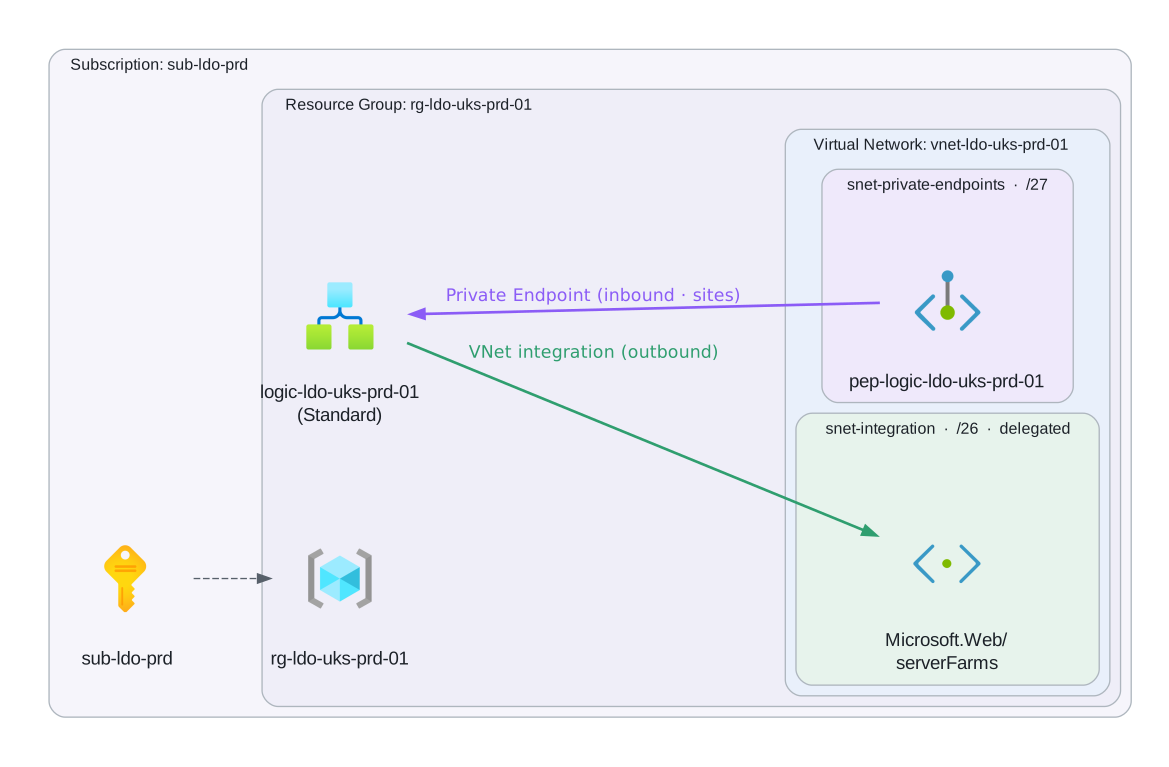
VNet integration (outbound traffic):
resource "azurerm_logic_app_standard" "this" {
  for_each = local.logic_app_map
  # ...
  virtual_network_subnet_id = var.integration_subnet_id   # /28 minimum, /26 recommended
}
The integration subnet must be delegated to Microsoft.Web/serverFarms and must not host any other resources.
Private endpoint (inbound traffic):
resource "azurerm_private_endpoint" "this" {
  for_each = local.logic_app_map

  # Convention: pep-{resource_name} - the protected resource name already contains
  # the environment and region, so no suffix is added.
  name                = "pep-${each.key}"
  resource_group_name = var.rg_name
  location            = var.location
  subnet_id           = var.private_endpoint_subnet_id

  private_service_connection {
    name                           = "psc-${each.key}"
    private_connection_resource_id = azurerm_logic_app_standard.this[each.key].id
    subresource_names              = ["sites"]
    is_manual_connection           = false
  }
}
When a private endpoint is configured:
- The public HTTP trigger URL still exists but can be disabled via
public_network_access = "Disabled" - Sentinel Automation Rules can still trigger the playbook directly via the ARM plane, regardless of network access settings
- HTTP webhook callers must be within the VNet or use a peered/connected network
Outbound IP stability:
The outbound IPs of a Standard Logic App are the outbound IPs of its underlying App Service Plan. These are stable and listed in the Azure Portal under the App Service Plan → Properties → Outbound IP addresses. Use these for allowlisting in third-party services (ServiceNow, Splunk, external APIs).
# Get outbound IPs via CLI
az webapp show \
  --name logic-ldo-uks-prd-001 \
  --resource-group rg-ldo-uks-prd-001 \
  --query outboundIpAddresses -o tsv
Network Security Group on the integration subnet:
Inbound:
  Allow: Azure Logic Apps service tag → subnet (for platform health checks)

Outbound:
  Allow: subnet → Log Analytics workspace (AzureMonitor service tag) - for diagnostics
  Allow: subnet → Key Vault private endpoint (port 443)
  Allow: subnet → Storage account (Azure Storage service tag) - Standard stateful storage
  Allow: subnet → external services (specific IPs/FQDNs per integration)
  Deny: all other outbound
Inbound security for HTTP triggers
For Standard Logic Apps with HTTP triggers, layer multiple controls:
- Private endpoint: Prevent public internet access entirely
- IP restriction in App Settings: Allows only specific CIDR ranges, even within the VNet
- Azure API Management: Route all external webhooks through APIM, which handles mTLS, OAuth, and rate limiting
- SAS signature: The trigger URL includes a signature - keep it secret and rotate it on a schedule
Retries & Error Handling
Default retry policy
All managed connector actions have a default retry policy of 4 retries with exponential backoff starting at 7.5 seconds. For most integrations this is sufficient. Verify and override where needed.
{
  "type": "ApiConnection",
  "inputs": { "...": "..." },
  "runAfter": {},
  "runtimeConfiguration": {
    "staticResult": { "name": "...", "staticResultOptions": "Disabled" }
  },
  "operationOptions": "DisableAsyncPattern",
  "retryPolicy": {
    "type": "exponential",
    "count": 4,
    "interval": "PT7.5S",
    "minimumInterval": "PT5S",
    "maximumInterval": "PT1H"
  }
}
Retry policy types:
| Type | Use case |
|---|---|
exponential | Default for most actions - backs off to avoid overwhelming the target |
fixed | Use when the target has a known recovery time (e.g. “retry every 30s”) |
none | Fire-and-forget actions where retrying would cause duplicate side effects |
Rule: Set
type: noneon actions that are not idempotent - Teams notifications, email sends, JIRA ticket creation. Retrying these creates duplicate messages. Set exponential on all read operations and safe writes.
Run After (structured error handling)
Use Run After configuration to build error handling branches that fire on failure, timeout, or skip conditions.
Action: Call External API
├── Run After: preceding step succeeded
├── On Success: continue
└── On Failure / Timeout / Skipped:
    └── Scope: Error Handler
        ├── Send Teams alert: "Logic App {{workflow().name}} failed at {{actions('Call_External_API').startTime}}"
        ├── Add Sentinel incident comment: "Automation failed - manual review required"
        └── Terminate: Failed (with descriptive error message)
Scope blocks for structured try/catch
Wrap the main workflow body in a Scope block. Add a second Scope block configured to run after the first scope fails:
Scope: Main Workflow
  ├── [all your workflow actions]
  └── runs on: succeeded

Scope: Error Handler
  ├── runs on: Main Workflow failed OR timed out OR skipped
  ├── Send failure notification
  ├── Optionally: Update Sentinel incident status to "In Progress" with comment
  └── Terminate action: Failed
Always end a failure handler with a Terminate action set to Failed. Without this, the workflow run reports Succeeded even though the main logic failed - this silently swallows errors.
Sentinel-specific error handling
When the playbook is triggered by Sentinel, always write back to the incident regardless of success or failure:
On success:
  Sentinel: Add comment to incident
    Comment: "Playbook completed successfully. [Summary of actions taken]."
  Sentinel: Update incident status (if appropriate: Closed/Active)

On failure:
  Sentinel: Add comment to incident
    Comment: "⚠️ Playbook failed at step [action name]. Error: [error message]. Manual review required."
  Do NOT close or change the incident status - leave it for human review
Timeout considerations
| Hosting | Action timeout | Workflow timeout |
|---|---|---|
| Consumption | 120 seconds per action | 90 days total |
| Standard (stateful) | Configurable (default 1 hour) | No limit |
| Standard (stateless) | Configurable (default 5 minutes) | 5 minutes |
Standard stateless workflows cannot call asynchronous actions or polling connectors. If your workflow uses HTTP triggers with async responses, Azure Monitor polling, or any action that takes >5 minutes, use stateful.
For long-running operations (batch processing, large KQL result sets), use the async HTTP pattern :
1. HTTP request → Logic App HTTP trigger
2. Logic App responds immediately: 202 Accepted + Location header (status endpoint URL)
3. Caller polls the status URL
4. Logic App updates a Storage Table with run status
5. Status endpoint returns 200 OK when complete
Terraform
The authoring model, decided first
Before hosting model, before modules, decide how the workflow definition itself is authored. Two paths exist and they are not mix-and-match within one workflow.
| Whole-definition (azapi) | Per-resource (azurerm) | |
|---|---|---|
| The definition is | one JSON document, deployed verbatim in a single PUT | assembled from azurerm_logic_app_trigger_* and azurerm_logic_app_action_* resources |
| Ordering comes from | runAfter inside the definition, and nothing else | runAfter and a second Terraform dependency graph across resources, kept in lockstep by hand |
| A portal export | is the artefact, pasted in and tokenised | has to be taken apart into resources |
| Drift review is | a JSON diff against a fresh export | archaeology across four resources per playbook |
| Terraform-owned values arrive by | templatefile tokens and typed workflow parameters | HCL attributes on each resource |
The whole-definition path is the standard. Logic Apps are authored in a designer by people who are not necessarily Terraform authors, and the per-resource split throws away the one artefact that designer produces. It also creates a second ordering graph that can disagree with runAfter, and a Consumption trigger PATCHed individually out of a live definition can hit CannotDisableTriggerConcurrency, which a whole-workflow PUT cannot.
Use the per-resource path only where a workflow is genuinely built in HCL and never opened in the designer, or where an existing estate already uses it and converting is not worth the churn. Both are documented below; the per-resource sections are the alternative, not the default.
Rule: One workflow, one authoring model. Never split a definition so that some actions are resources and the rest are JSON. The two ordering graphs will disagree and the failure surfaces at run time, not at apply.
Whole-definition workflows with azapi
The module is terraform-azapi-logic-app-workflow. It deploys a Consumption workflow whole: one PUT carries the definition, the typed parameter values, the generated $connections parameter and the identity, so the authored artefact is the deployed artefact.
Not yet on the Terraform Registry. The module is released on GitHub (4.4.0) but
libre-devops/logic-app-workflow/azapidoes not resolve onregistry.terraform.iotoday. Until it is published, source it by tag:HCLsource = "git::https://github.com/libre-devops/terraform-azapi-logic-app-workflow.git?ref=4.4.0"Every example below shows the registry form, which is what to use the moment it is published.
The round trip
This is the whole method, and it is deliberately short:
- Build it in the designer. That is what the designer is good at, and what the people who own the playbook logic can actually use.
- Open the code view and copy the whole thing. Do not reshape it.
- Paste it into
templates/<workflow-name>.json.tftpl. - Ctrl+F the values Terraform owns into
${tokens}. Nothing else changes. - Plan. The guard rails below fail the plan rather than the apply.
Any of the three shapes Azure hands you pastes straight in, because the module unwraps the outer two:
| Copied from | Shape |
|---|---|
| Designer, Logic app code view | {"definition": {...}, "parameters": {...}} |
az rest, az logic workflow show, Export template | {"properties": {"definition": {...}, ...}, "id": ..., "name": ...} |
| Another template in this shape | the bare definition, {"$schema": ..., "triggers": ..., "actions": ...} |
A workflow definition has no top-level definition or properties key of its own, so the unwrap is unambiguous. Portal read-back fields such as evaluatedRecurrence on a Recurrence trigger survive the round trip and deploy as pasted, so there is nothing to hand-strip before committing.
Rule: The committed template must diff cleanly against a fresh portal export. That property is the entire point: it makes drift review a JSON diff, and it proves a refactor changed nothing by producing a byte-identical render.
The template file and the token contract
Layout is one template per workflow, named after it, beside the calling configuration:
.
├── main.tf
├── variables.tf
└── templates/
    ├── incident-ack.json.tftpl
    └── sentinel-enrich-notify.json.tftpl
.json.tftpl is the extension: .json so editors and linters treat it as JSON, .tftpl so it is obviously a Terraform template and not a deployable artefact on its own.
Inside, the file is the export verbatim except for the tokens:
{
    "$schema": "https://schema.management.azure.com/providers/Microsoft.Logic/schemas/2016-06-01/workflowdefinition.json#",
    "contentVersion": "1.0.0.0",
    "parameters": {},
    "triggers": {
        "Recurrence_daily": {
            "type": "Recurrence",
            "recurrence": { "frequency": "Day", "interval": 1 }
        }
    },
    "actions": {
        "Compose_-_Say_the_greeting": {
            "type": "Compose",
            "inputs": "${greeting}",
            "runAfter": {}
        }
    },
    "outputs": {}
}definition = templatefile("${path.module}/templates/daily-greeting.json.tftpl", {
greeting = "hello from ${local.logic_name}"
})Workflow Definition Language does not collide with Terraform’s template syntax. WDL interpolates with @{...} and calls functions as @parameters('x') or @triggerBody(), none of which Terraform touches. That is what makes pasting an export safe.
Two characters do collide, and both have escapes:
| In the definition | Write | Because |
|---|---|---|
a literal ${ | $${ | ${ opens a Terraform interpolation |
a literal %{ | %%{ | %{ opens a Terraform directive such as %{ if ... } |
These turn up in Compose actions carrying shell, regex or another system’s template text. If a plan fails with a template parse error inside a definition, this is almost always why.
What becomes a token, and what does not:
- Tokenise what Terraform genuinely owns and the designer cannot know: resource ids, subscription and tenant ids, workspace names, environment-specific endpoints, anything derived from a
localor another module’s output. - Do not tokenise anything the designer round-trips. Every token is a place the committed template stops matching a fresh export, so each one costs you a little of the diff property that justifies this path.
- Do not tokenise a value the workflow should expose at run time. Use a typed workflow parameter instead (below). A token is substituted at plan time and vanishes; a parameter is visible in the portal, documented, and changeable without a redeploy of the definition.
Rule: Prefer a typed workflow parameter over a template token whenever the value is one an operator might reasonably want to see or change. Reserve tokens for values that are structurally Terraform’s, such as ids.
Note the contrast with the per-resource path: there, a definition fragment has to be re-wrapped as jsonencode(merge(jsondecode(templatefile(...)), { runAfter = {} })) to avoid double-nesting actions.actions. Here the module takes the rendered string and decodes it itself, so templatefile(...) goes straight into definition with nothing wrapped around it.
The module call
# terraform.tf
terraform {
  required_providers {
    azapi = {
      source  = "azure/azapi"
      version = ">= 2.0.0, < 3.0.0"
    }
    azurerm = {
      source  = "hashicorp/azurerm"
      version = ">= 4.0.0, < 5.0.0"
    }
  }
}

# main.tf
module "playbooks" {
  source  = "libre-devops/logic-app-workflow/azapi"
  version = "~> 4.0"

  resource_group_id = module.rg.ids["rg-ldo-uks-prd-001"]
  location          = var.location
  tags              = module.tags.tags

  # One diagnostics default for the whole call, overridable per workflow.
  diagnostics = {
    log_analytics_workspace_id = module.law.workspace_ids["log-ldo-uks-prd-001"]
  }

  # Connections every workflow in the call inherits (opt out per workflow with
  # use_shared_connections = false). Most playbook estates share the same few.
  shared_connections = {
    "azuresentinel" = {
      connection_id         = azapi_resource.sentinel_connection.id
      connection_name       = local.conn_name
      managed_api_id        = data.azurerm_managed_api.sentinel.id
      managed_identity_auth = true
    }
  }

  workflows = {
    "logic-ldo-uks-prd-001" = {
      title = "Sentinel Incident - Enrich and notify Teams on High severity"

      # The whole definition, rendered from the portal export.
      definition = templatefile("${path.module}/templates/sentinel-enrich-notify.json.tftpl", {
        workspace_id = module.law.workspace_ids["log-ldo-uks-prd-001"]
      })

      # VALUES only. The DECLARATIONS stay in the definition, where the portal put them.
      parameters = {
        severity_floor     = { type = "String", value = var.severity_floor }
        notify_webhook_url = { type = "SecureString", value = var.notify_webhook_url }
      }

      callback_trigger_name = "manual"
    }
  }
}
title is required and the module stamps hidden-title from it, so an untitled workflow cannot be deployed through this path either (see Hidden Title tag).
Parameter values and precedence
The split is the thing to internalise: declarations live in the definition, values live in Terraform. The portal exports declarations, so they arrive with the paste and stay put. The module supplies values and validates the two halves against each other at plan time.
From 4.4.0 a pasted wrapper’s own parameters block is adopted, because a portal export carries a value for every parameter its definition declares. That is what lets an unedited export deploy untouched. Precedence, lowest to highest:
- a
defaultValueinside the definition - whatever the pasted wrapper carried
- the
parametersinput on the module - the generated
$connections
So naming a parameter in parameters always wins over what arrived with the paste.
Two things are never adopted from a wrapper, each for cause:
$connections, because the wrapper’s copy names the source environment’s connection resources. The module generates the whole value fromconnectionsandshared_connections.SecureStringandSecureObjectvalues, because a secret typed into the designer would otherwise land in a template file, the plan output and the state body. Secure values stay an explicit input.
Connections on Consumption
Consumption accepts only V1 Microsoft.Web/connections, and V1 connections reject access policies. Managed identity auth is therefore two halves that must both be present:
parameterValueType = "Alternative"on the connection resource itself.- the
connectionProperties.authenticationblock inside the$connectionsparameter value, which the module generates frommanaged_identity_auth = true.
Create the connection with azapi and look the managed API id up rather than assembling it (see API connections in Terraform (azapi)). There is no access policy resource on Consumption at all; adding one fails with InvalidApiConnectionAccessPolicy, and using a V2 connection fails with WorkflowInvalidApiConnectionV2.
Ordering: deploy tiers
ARM validates a native Workflow dispatch action’s target at PUT time, so a workflow that invokes a sibling must deploy after it or the apply fails with NestedWorkflowNotFound. Sibling references are constructed ARM ids, never this module’s outputs, because a module output referenced from a definition in the same call is a dependency cycle.
deploy_tier expresses the ordering inside one module call:
| Tier | What sits there |
|---|---|
0 (default) | leaves: workflows nothing else dispatches to |
1 | their dispatchers |
2 | a dispatcher whose own target is a dispatcher, such as a router invoking a hooked handler |
Secrets, state and plan hygiene
- Secure values ride the provider’s write-only
sensitive_body, so they never appear in plan output or in the state’sbody. Rotation is detected through the provider’s private-state hash. response_export_valuesdefaults to a trimmed, stable set.["*"]echoes the whole GET response including volatile fields such aschangedTime, which turns every plan into a no-op update-in-place on every workflow. Widen it per workflow only when you need more of the response.
The guard rails
The module’s split between hard failures and warnings is evidence-based: anything the platform rejects is a plan-time validation, and anything that deploys cleanly then bites later is a check.
| Fails the plan | Only warns |
|---|---|
| a parameter declared with no value anywhere | a definition with no trigger |
a connection with no $connections declaration | a $connections declaration nothing is wired to |
a callback_trigger_name that does not exist | a connection the definition never references |
an open authentication policy with no aud claim | a trigger with SAS off and no policy |
| an empty module call |
The first column matters because the alternative is discovering it at apply. A valueless parameter, for example, is rejected by the engine as InvalidTemplate with “the value for the workflow parameter … is not provided”, which is a slow way to learn something a plan can tell you.
Standard workflow content: the same contract, a different artefact
Everything above deploys a Consumption workflow, where the definition is an ARM resource. On
Standard it is not. There is no Microsoft.Web/sites/workflows type. A Standard workflow is a
file in a package the Functions host loads:
MyStandardApp.zip
├── incident-ack/
│   └── workflow.json
├── sentinel-enrich-notify/
│   └── workflow.json
├── connections.json
└── host.json
Each workflow.json wraps the same Workflow Definition Language definition in two properties:
{
    "definition": {
        "$schema": "https://schema.management.azure.com/providers/Microsoft.Logic/schemas/2016-06-01/workflowdefinition.json#",
        "contentVersion": "1.0.0.0",
        "triggers": { },
        "actions": { }
    },
    "kind": "Stateful"
}
The definition block is identical to a Consumption definition. Every WDL rule in this document
applies to it unchanged, and the
annotated schema
validates it, so the editor tooling is the same on both hosting models.
Rule:
kindisStatefulunless you have measured that 5 minutes is always enough. Stateless has a 5 minute execution ceiling and no run history, which makes an incident unreconstructable. See Hosting Model.
Three differences that are not cosmetic:
| Consumption | Standard | |
|---|---|---|
| The definition is | an ARM resource | a file in a package |
| Parameter values come from | the ARM body’s parameters | app settings, referenced as @appsetting('name') |
| Connections | V1, access policies rejected | V2 in connections.json, access policies required |
connections.json is where Standard deployments fail. Visual Studio Code writes managed API
connections with a Raw scheme and an appsetting key. Azure expects
"authentication": {"type": "ManagedServiceIdentity"}. Releasing the local shape unchanged is the
single most common Standard deployment failure, and the error it produces does not say so.
The templatefile token contract is unchanged: author in the designer, export, tokenise the values
Terraform owns. terraform-azapi-logic-app-standard-workflows
renders each workflow.json, builds the package and deploys it through the ARM ZipDeploy
extension, so no publishing profile is needed and the package hash appears in the plan.
Cookie-cutter vs custom Logic Apps
This section and the three that follow cover the per-resource authoring path and the Standard hosting app. For Consumption workflows the whole-definition path above is the standard; read on if you are hosting a Standard app, or maintaining an estate already built per resource.
Before choosing whether to use a module or write raw resources, decide whether the Logic App is cookie-cutter or custom. This distinction determines the right Terraform approach.
A cookie-cutter Logic App has all of the following:
- Standard hosting: Linux OS, WS1-WS3 SKU, App Service Plan
- Standard identity: System-assigned (or a single shared User-assigned) managed identity
- Standard networking: optional VNet integration subnet, optional private endpoint - no ASE, no special network policies
- Standard site config:
always_on, TLS 1.2, FTPS disabled, HTTP2 - Standard App Settings: App Insights key, Key Vault references for secrets, no custom environment injection at deploy time
- No resource-level
lifecycleoverrides beyondignore_changesonapp_settings["WEBSITE_RUN_FROM_PACKAGE"] - No cross-resource dependencies that require orchestrating creates/destroys outside of Terraform’s normal graph
If all of the above apply, use the module. The module’s map(object) input (keyed by resource name) means you can declare several cookie-cutter Logic Apps in a single call without duplicating configuration.
The v-next module split follows the hosting models:
| Hosting model | Module | What it manages |
|---|---|---|
| Consumption, whole definition (standard) | terraform-azapi-logic-app-workflow | The workflow entire: the definition deploys verbatim in one PUT alongside parameter values, generated $connections, identity and diagnostics. See Whole-definition workflows with azapi. |
| Consumption, per resource | libre-devops/logic-app-workflow/azurerm | The workflow shell only: identity, typed parameters, $connections generation, diagnostics, access control, hidden-title. Triggers and actions stay raw (see below). |
| Standard | libre-devops/logic-app-standard/azurerm | The Functions-host app: plan, storage, site config, identity, VNet surface. Workflow definitions deploy as workflow.json files, not Terraform resources. |
A custom Logic App has any of the following:
- App Service Environment v3 (ASEv3) hosting
- Multiple storage accounts per Logic App (e.g. separate accounts for different workflow groups)
- Complex
lifecycleblocks -create_before_destroy,prevent_destroy, per-attributeignore_changesbeyond the standard set - Per-resource provider aliases or multi-subscription deployments
- Custom scaling rules that attach to the App Service Plan in a way the module does not expose
- Dependency relationships on resources the module does not manage (e.g. the Logic App must only be created after a specific database migration completes)
- Any situation where the module abstraction forces you to work around it rather than with it
If any of the above apply, do not use the module - write raw azurerm_logic_app_standard, azurerm_service_plan, and supporting resources directly. Fighting a module to accommodate a non-standard requirement produces harder-to-read code than writing the resources explicitly.
Rule: Modules exist to reduce repetition for standard cases. They are not a substitute for understanding the underlying resources. If you cannot immediately explain what a module call expands to, you should not be using it in a production deployment.
Module usage (cookie-cutter)
# terraform.tf
terraform {
  required_providers {
    azurerm = {
      source  = "hashicorp/azurerm"
      version = ">= 4.0.0, < 5.0.0"
    }
    azapi = {
      source  = "azure/azapi"
      version = ">= 2.0.0, < 3.0.0"
    }
  }
}

# main.tf - Consumption: the workflow shell comes from the module; triggers and
# actions stay raw (see "Workflow trigger standards" below). The module builds
# hidden-title from the required title, splits typed parameters into definitions
# and values, generates the $connections parameter (with ManagedServiceIdentity
# auth where asked), and wires the diagnostic setting.
module "logic_app_workflows" {
  source  = "libre-devops/logic-app-workflow/azurerm"
  version = "~> 4.0"

  resource_group_id = module.rg.ids["rg-ldo-uks-prd-001"]
  location          = var.location
  tags              = module.tags.tags

  # Connections every workflow in the call gets (opt out per workflow with
  # use_shared_connections = false). Most playbook estates share the same few.
  shared_connections = {
    azuresentinel = {
      connection_id         = azapi_resource.sentinel_connection.id
      managed_api_id        = data.azurerm_managed_api.sentinel.id
      managed_identity_auth = true
    }
  }

  # One diagnostics default for the whole call, overridable per workflow.
  diagnostics = {
    log_analytics_workspace_id = module.law.workspace_ids["log-ldo-uks-prd-001"]
  }

  workflows = {
    "logic-ldo-uks-prd-001" = {
      title = "Sentinel Incident - Enrich and notify Teams on High severity"

      # Typed workflow parameters: the module renders the definitions (with
      # defaults, descriptions, and allowed values) and the value map, so the
      # workflow body references @parameters('...') and nothing is hardcoded.
      parameters = {
        severity_floor = {
          type          = "String"
          value         = var.severity_floor
          allowed_values = ["High", "Critical"]
          description   = "Lowest incident severity the playbook acts on."
        }
        notify_retry_count = {
          type  = "Int"
          value = "3"
          description = "Explicit retry budget for the notification HTTP call."
        }
      }

      access_control = {
        trigger = { allowed_ips = var.trusted_caller_cidrs }
      }
    }
  }
}

# main.tf - Standard: the app host comes from the logic-app-standard module;
# workflow definitions deploy as workflow.json, not Terraform resources.
module "logic_apps_standard" {
  source  = "libre-devops/logic-app-standard/azurerm"
  version = "~> 4.0"

  resource_group_id = module.rg.ids["rg-ldo-uks-prd-001"]
  location          = var.location
  tags              = module.tags.tags

  logic_apps = {
    "logic-ldo-uks-prd-002" = {
      virtual_network_subnet_id = module.network.subnets_ids["snet-integration"]
    }
  }
}
Raw resource (custom)
When the Logic App is non-standard, write the resources explicitly. This is more verbose but completely transparent - no module abstraction to look through.
# App Service Plan - written directly when the module's plan configuration is insufficient
resource "azurerm_service_plan" "this" {
  name                = "plan-ldo-uks-prd-001"
  resource_group_name = azurerm_resource_group.this.name
  location            = var.location
  os_type             = "Linux"
  sku_name            = "WS2"

  # Example custom requirement: zone balancing enabled - not exposed by the module
  zone_balancing_enabled = true

  tags = var.tags
}

# Logic App - written directly
resource "azurerm_logic_app_standard" "this" {
  name                       = "logic-ldo-uks-prd-001"
  resource_group_name        = azurerm_resource_group.this.name
  location                   = var.location
  app_service_plan_id        = azurerm_service_plan.this.id
  storage_account_name       = azurerm_storage_account.logic_app.name
  storage_account_access_key = azurerm_storage_account.logic_app.primary_access_key
  https_only                 = true
  enabled                    = true
  public_network_access      = "Disabled"
  virtual_network_subnet_id  = azurerm_subnet.integration.id

  app_settings = {
    "APPINSIGHTS_INSTRUMENTATIONKEY"        = azurerm_application_insights.this.instrumentation_key
    "APPLICATIONINSIGHTS_CONNECTION_STRING" = azurerm_application_insights.this.connection_string
    "WEBSITE_RUN_FROM_PACKAGE"              = "1"
    # Custom: reference a secret that only this Logic App needs
    "DOWNSTREAM_API_KEY" = "@Microsoft.KeyVault(VaultName=${azurerm_key_vault.this.name};SecretName=downstream-api-key)"
  }

  identity {
    type = "SystemAssigned"
  }

  site_config {
    always_on       = true
    min_tls_version = "1.2"
    ftps_state      = "Disabled"
    http2_enabled   = true
  }

  # Custom lifecycle: prevent accidental destroy in production
  lifecycle {
    prevent_destroy = true
    ignore_changes  = [app_settings["WEBSITE_RUN_FROM_PACKAGE"]]
  }

  tags = merge(var.tags, {
    hidden-title = "HTTP - Receive GitHub webhook and create JIRA ticket"
  })

  # The Key Vault must be accessible before the Logic App can start up and read its secrets
  depends_on = [
    azurerm_role_assignment.kv_secrets_user,
    azurerm_subnet.integration,
  ]
}
Workflow trigger standards (azurerm provider)
Alternative path. These standards apply when triggers are
azurerm_logic_app_trigger_*resources. On the whole-definition path the trigger is part of the pasted definition and these rules describe its JSON rather than its HCL.
Triggers are the entry point for Logic App workflows. They define how and when a workflow executes - whether by external HTTP request, scheduled timer, or incoming message/event. Define triggers as separate Terraform resources using azurerm_logic_app_trigger_*.
Consumption only: the
azurerm_logic_app_trigger_*andazurerm_logic_app_action_*resources attach to aMicrosoft.Logic/workflowsresource (Consumption). They cannot target a Standard Logic App - a Standard app’s workflows areworkflow.jsonfiles deployed to the site, not ARM children. The examples below take the workflow id from the module:
locals {
  playbook_workflow_id = module.logic_app_workflows.ids["logic-ldo-uks-prd-001"]
}
Trigger positioning: Triggers do not have depends_on - they are root-level entry points that actions depend on. A workflow has exactly one active trigger. If you need multiple trigger types, create separate Logic Apps or use conditional branching after a single trigger.
Key decision: Trigger type selection
| Scenario | Trigger Type | Why | Example |
|---|---|---|---|
| Manual invocation or external system webhooks | HTTP Request | Caller controls when workflow runs; good for on-demand and integrations | GitHub webhook → create ticket |
| Recurring automated tasks | Recurrence | Fixed schedule; predictable cost and execution | Daily threat hunt KQL query |
| Sentinel incident automation | Sentinel Incident (custom) | Native incident data; direct role assignment in Standard Logic Apps | Enrich and notify on incident creation |
| Event-driven (message queue) | Service Bus (custom) | Reliable message processing; automatic retry | Process incident queues |
| Reactive to resource events | Event Grid (custom) | Event-driven without polling; push-based | Storage blob created → scan for malware |
| Third-party service events | Custom webhook | Platform-specific integration | Slack message, Teams notification |
HTTP Request trigger (manual invocation)
Use when: External systems need to invoke the workflow; caller controls execution time. Common in Sentinel playbooks, webhook integrations, or on-demand operations.
Considerations:
- Requires schema definition to validate incoming requests (protects against malformed payloads)
- Each HTTP trigger generates a unique callback URL; share this carefully (publish to only trusted callers)
- Stateless execution makes HTTP triggers ideal for one-shot operations (no run history overhead)
- Timeout: 120 seconds per request (Consumption) or configurable (Standard)
Avoid: Using HTTP trigger for scheduled tasks (use Recurrence instead); sending sensitive data in request body without encryption
resource "azurerm_logic_app_trigger_http_request" "http_trigger" {
  name         = "When_HTTP_request_is_received"
  logic_app_id = local.playbook_workflow_id

  # Schema validates incoming request body - required
  schema = jsonencode({
    type       = "object"
    properties = {
      incident_id = {
        type        = "string"
        description = "Sentinel incident ID"
      }
      severity = {
        type        = "string"
        enum        = ["Low", "Medium", "High", "Critical"]
        description = "Incident severity level"
      }
      payload = {
        type       = "object"
        properties = {
          assets = { type = "array" }
          tags   = { type = "object" }
        }
      }
    }
    required = ["incident_id", "severity"]
  })

  method = "POST"
}
Recurrence trigger (scheduled execution)
Use when: Workflow runs on a fixed schedule - daily scans, hourly reports, weekly reviews. Good for automated threat hunting, compliance checks, or routine data synchronization.
Considerations:
start_timemust be in ISO 8601 UTC format (e.g.,2024-01-01T08:00:00Z); do not use local time- Use
time_zone = "UTC"to avoid DST confusion; if end-user sees times, convert client-side - Frequency + interval determine execution:
frequency = "Day"+interval = 1= every day;frequency = "Hour"+interval = 6= every 6 hours - Recurrence runs at the specified time; if Logic App is down, it queues and runs when available
- Cost: Fixed App Service Plan cost; no per-execution billing
Avoid: Recurrence intervals less than 1 minute (Azure limit); complex schedules (use multiple Logic Apps instead); hardcoded start times that become outdated
resource "azurerm_logic_app_trigger_recurrence" "schedule_trigger" {
  name         = "Recurrence_daily_enrichment"
  logic_app_id = local.playbook_workflow_id

  frequency  = "Day"
  interval   = 1
  start_time = "2024-01-01T08:00:00Z"  # UTC only
  time_zone  = "UTC"

  # Optional: restrict to business days
  schedule {
    days_of_week = ["Monday", "Tuesday", "Wednesday", "Thursday", "Friday"]
  }
}
Custom trigger - Sentinel Incident (native security automation)
Use when: Responding to Sentinel incident creation or updates. Automatically enriches, correlates, or escalates high-severity incidents without manual intervention.
Considerations:
- Requires a Sentinel API connection (a V1
Microsoft.Web/connectionsfor Consumption - see the connections section for the V1/V2 hosting split) - On Consumption this is the default playbook pattern: the
azurerm_logic_app_trigger_custombelow IS the “When a Microsoft Sentinel incident is created” trigger, with auth carried by the module-generated$connectionsparameter - Incident data is passed directly; no schema validation needed (Sentinel defines the structure)
- Supports filtering by severity, product, or custom analytics rules
- Fires synchronously; if workflow exceeds 1 hour, incident may be locked or escalated
- Cost: Included in Standard Logic App plan (no per-incident charges)
Avoid: Logic Apps that take > 1 hour per incident (design for parallel execution); blocking on external API calls without timeout; hardcoding watchlist IDs or DCE immutable IDs (use Terraform variables instead)
# The V1 Sentinel connection comes from the connections section (azapi, no access
# policy on Consumption); the module's shared_connections input generates the
# $connections parameter the trigger references below.

# Sentinel incident trigger: an ApiConnectionWebhook on the azuresentinel connector.
# The connection is referenced through @parameters('$connections'), never by raw id,
# so the module-generated parameter carries the managed identity auth.
resource "azurerm_logic_app_trigger_custom" "sentinel_incident" {
  name         = "When_a_Sentinel_incident_is_created"
  logic_app_id = local.playbook_workflow_id

  body = jsonencode({
    description = "Fires when Microsoft Sentinel creates an incident; wired to Sentinel via an automation rule."
    type        = "ApiConnectionWebhook"
    inputs = {
      host = {
        connection = {
          name = "@parameters('$connections')['azuresentinel']['connectionId']"
        }
      }
      body = {
        callback_url = "@{listCallbackUrl()}"
      }
      path = "/incident-creation"
    }
  })
}

# Example: later action referencing the trigger. Terraform-evaluated values (the
# watchlist alias here) are interpolated by reference, never hardcoded strings.
resource "azurerm_logic_app_action_custom" "compose_enrichment_context" {
  name         = "Compose_-_Assemble_the_enrichment_context_for_the_incident"
  logic_app_id = local.playbook_workflow_id

  body = jsonencode({
    description = "Distils the incident and the threat actor watchlist alias into one enrichment payload."
    type        = "Compose"
    inputs = {
      watchlist_alias = azurerm_sentinel_watchlist.threat_actors.name
      incident_id     = "@{triggerBody()?['object']?['id']}"
      severity        = "@{triggerBody()?['object']?['properties']?['severity']}"
    }
    runAfter = {}
  })

  depends_on = [azurerm_logic_app_trigger_custom.sentinel_incident]
}
Custom trigger - Service Bus Queue (reliable message processing)
Use when: Incidents or alerts are queued in Service Bus; workflow processes them asynchronously. Good for decoupling producers from consumers, handling traffic spikes, and guaranteed delivery.
Considerations:
- Service Bus provides automatic retry, dead-lettering, and message expiration
- Polling interval: 30 seconds (configurable in Standard Logic Apps)
- Scale horizontally: multiple Logic App instances pull from same queue without duplication
- Messages auto-complete after processing; set
isSessionEnabled = truefor ordered message groups - Cost: Consumed as part of Standard plan; message charges apply
Avoid: Polling very frequently (< 30s causes unnecessary scaling); processing without error handling (unprocessed messages stay in queue); hardcoding queue names
# The servicebus V1 connection is created with azapi like the Sentinel one (see the
# connections section) and declared in the module's connections input, which generates
# the $connections parameter the trigger references.

# Queue trigger - polls on a recurrence; the queue name comes from a Terraform variable
resource "azurerm_logic_app_trigger_custom" "service_bus_trigger" {
  name         = "When_a_message_arrives_on_the_incident_queue"
  logic_app_id = local.playbook_workflow_id

  body = jsonencode({
    description = "Polls the incident queue once a minute and starts a run per message."
    type        = "ApiConnection"
    recurrence = {
      frequency = "Minute"
      interval  = 1
    }
    inputs = {
      host = {
        connection = {
          name = "@parameters('$connections')['servicebus']['connectionId']"
        }
      }
      method = "get"
      path   = "/@{encodeURIComponent('${var.incident_queue_name}')}/messages/head"
      queries = {
        queueType = "Main"
      }
    }
  })
}
Custom trigger - Event Grid (event-driven automation)
Use when: Azure resources emit events (blob storage, Key Vault, Log Analytics); workflow reacts immediately without polling. Efficient for event-driven architectures.
Considerations:
- Event Grid is push-based (not polling); immediate execution on event
- Requires Event Grid subscription and topic configuration
- Filters by event type (e.g., BlobCreated, SecretCreated, ResourceWriteSuccess)
- Includes event metadata (timestamp, resource ID, properties)
- Cost: Low cost per event; scales automatically
Avoid: Using Event Grid for internal app state changes (use Service Bus instead); not setting event filters (can overwhelm workflow)
# The azureeventgrid V1 connection is created with azapi like the Sentinel one (see the
# connections section) and declared in the module's connections input.

# Event Grid trigger - blob storage events, push-based (ApiConnectionWebhook)
resource "azurerm_logic_app_trigger_custom" "event_grid_trigger" {
  name         = "When_a_blob_is_created_in_the_evidence_container"
  logic_app_id = local.playbook_workflow_id

  body = jsonencode({
    description = "Push notification from Event Grid when the storage account writes a blob."
    type        = "ApiConnectionWebhook"
    inputs = {
      host = {
        connection = {
          name = "@parameters('$connections')['azureeventgrid']['connectionId']"
        }
      }
      # Reference the storage account from Terraform - do not hardcode
      path = "/subscriptions/@{encodeURIComponent('${data.azurerm_client_config.current.subscription_id}')}/providers/@{encodeURIComponent('Microsoft.Storage.StorageAccounts')}/resource/eventSubscriptions"
      queries = {
        "x-ms-api-version" = "2017-06-15-preview"
      }
      body = {
        properties = {
          topic = azurerm_storage_account.logs.id
          destination = {
            endpointType = "webhook"
            properties = {
              endpointUrl = "@{listCallbackUrl()}"
            }
          }
          filter = {
            includedEventTypes = ["Microsoft.Storage.BlobCreated"]
          }
        }
      }
    }
  })
}
Trigger naming standards:
Trigger and action names are the workflow’s display surface: run history, error messages, and runAfter edges all show them. Be verbose - a name should read as a sentence describing the event. The underscores are a Logic Apps constraint, not a style choice: these names are engine identifiers (runAfter, @outputs('...')) and spaces are invalid, so underscores stand in and the designer renders them as spaces. Do NOT carry the underscores to resources that accept real spaces - Azure Monitor alert rule names, for example, take spaces and read better with them.
| Trigger Type | Naming Pattern | Example |
|---|---|---|
| HTTP Request | When_[caller/event in plain words] | When_the_alert_storm_rule_fires_via_the_action_group |
| Recurrence | Recurrence_-_[schedule in plain words] | Recurrence_-_Once_a_day_at_08_00_UTC |
| Sentinel Incident | When_a_Sentinel_incident_[filter] | When_a_Sentinel_incident_is_created_High_or_Critical |
| Service Bus | When_a_message_arrives_on_[queue/topic] | When_a_message_arrives_on_the_incident_queue |
| Event Grid | When_[resource event in plain words] | When_a_blob_is_created_in_the_evidence_container |
| Custom Connector | When_[service]_[event in plain words] | When_a_Teams_message_is_posted_to_the_soc_channel |
Trigger best practices (Terraform):
- No
depends_onon triggers - Triggers are root entry points; actions depend on triggers via implicit trigger body references - Recurrence triggers - always use UTC - Avoid timezone confusion; use
time_zone = "UTC"with fixedstart_time(ISO 8601 format) - HTTP triggers - require schema - Document expected body structure; clients must validate against schema
- Connector triggers - reference
$connections- Never hardcode connection ids in trigger bodies; reference@parameters('$connections')['<connector>']['connectionId']and let the module’sconnectionsinput generate the parameter - Polling intervals - Service Bus (30s), Event Grid (push), Recurrence (configurable)
Example: Complete trigger + action dependency chain:
# Trigger - entry point, no depends_on
resource "azurerm_logic_app_trigger_recurrence" "daily_scan" {
  name         = "Recurrence_daily_threat_hunt"
  logic_app_id = local.playbook_workflow_id
  frequency    = "Day"
  interval     = 1
  start_time   = "2024-01-01T09:00:00Z"
  time_zone    = "UTC"
}

# Action - depends on trigger via trigger body
resource "azurerm_logic_app_action_http" "kql_query" {
  name         = "HTTP_-_Run_the_daily_threat_hunt_KQL_query"
  logic_app_id = local.playbook_workflow_id
  method       = "POST"
  # Host is the shared api.loganalytics.io endpoint; the path takes the workspace
  # GUID (customer ID) from .workspace_id, NOT the full ARM resource .id.
  uri          = "https://api.loganalytics.io/v1/workspaces/${azurerm_log_analytics_workspace.this.workspace_id}/query"

  depends_on = [azurerm_logic_app_trigger_recurrence.daily_scan]
}

# Action - depends on previous action
resource "azurerm_logic_app_action_custom" "parse_results" {
  name         = "Parse_-_KQL_results_into_typed_rows"
  logic_app_id = local.playbook_workflow_id
  # ...
  depends_on = [azurerm_logic_app_action_http.kql_query]
}
Workflow action standards (azurerm provider)
Alternative path. These standards apply when actions are
azurerm_logic_app_action_*resources. On the whole-definition path the actions arrive with the export and the JSON rules below still describe what good looks like inside it.
Workflow actions are defined as separate Terraform resources using azurerm_logic_app_action_*. This approach provides explicit dependency management, clear action ordering, and testability. Actions execute sequentially based on depends_on (or conditionally via runAfter in the action body).
Provider reality check: The azurerm provider exposes exactly two Logic App action resources -
azurerm_logic_app_action_httpandazurerm_logic_app_action_custom- plus three trigger resources (_trigger_http_request,_trigger_recurrence,_trigger_custom). There is no_action_scope,_action_condition,_action_for_each,_action_initialize_variable, or_action_parse_jsonresource. Every action other than a plain HTTP call is authored as anazurerm_logic_app_action_customwhosebodyis the action’s JSON definition, with itstypeset accordingly (Scope,If,Foreach,InitializeVariable,ParseJson,ApiConnection, etc.). The examples below follow this rule.
Action selection and dependencies
| Action Type | Use Case | When | Avoid |
|---|---|---|---|
| HTTP | REST API calls, webhooks, external integrations | Need external system data; calling internal microservices | For internal Logic App state; hardcoding API keys |
| Custom | Connector-based operations (Jira, Teams, Service Bus) | Using platform-specific connectors | Reinventing connector functionality with HTTP |
| Scope | Grouped actions with error handling (try/catch) | Multiple actions with shared error handler | Single action (overhead not justified) |
| Condition | Branching logic (if/else) | Multi-path workflows based on data | Complex decision trees (use Scope instead) |
| For Each | Iterating over arrays | Processing multiple incidents, alerts, recipients | Iterating strings (use split() + For Each) |
| Initialize Variable | Declare workflow-scoped variables | Need persistent state across actions | Hardcoding values; use variables for reusability |
Terraform best practices for actions
-
No hardcoding deferred values - Never include Terraform-evaluated IDs in action bodies as strings. Reference them directly:
HCL# WRONG - hardcoded ID becomes stale when DCE is recreated body = jsonencode({ dce_immutable_id = "/subscriptions/.../dces/my-dce-12345" }) # CORRECT - Terraform ensures ID is current body = jsonencode({ dce_immutable_id = azurerm_monitor_data_collection_endpoint.this.immutable_id }) -
jsonencode() for inline bodies, templatefile() for large or repeated ones - Use
jsonencode()for action/trigger bodies authored inline in HCL (it prevents quote escaping and guarantees valid JSON). Once a body is large, or the same body is rendered per item (one create handler per product), lift it into atemplates/<name>.json.tftplfile and load it withtemplatefile(path, vars), thenjsonencode(merge(jsondecode(templatefile(...)), { runAfter = {} })). The template keeps the workflow’s@{...}runtime expressions readable as JSON and injects only the Terraform-known values (${snow_url},${msi_identity_id}, and so on) that authentication blocks cannot take as workflow parameters. Only${and%{trigger template substitution, so Logic App@{...}and OData$select/$connectionspass through untouched. Prefer this over a chain ofreplace()calls stamping placeholder tokens. -
Variables for reusable values - Store queue names, API endpoints, watchlist names as Terraform variables:
HCL# In variables.tf variable "incident_queue_name" { type = string default = "incident-queue" } # In action body path = "/queue/@{encodeURIComponent('${var.incident_queue_name}')}/messages" -
Connection references - Reference connections through the
$connectionsparameter (generated by the workflow module’sconnectionsinput), never as hardcoded ids:HCLhost = { connection = { name = "@parameters('$connections')['azuresentinel']['connectionId']" } } -
depends_onorders Terraform,runAfterorders the workflow - these are two different graphs and BOTH are required (proven live).depends_ononly controls the order Terraform creates the action resources; the Logic Apps engine executes from therunAfteredges in the JSON. An action whose expressions reference another action (@outputs('X')) without arunAfteredge to it fails deployment withInvalidTemplate(“must be defined in run after graph”), and a missingdepends_oncan make Terraform PUT actions in an order the engine validator rejects. Every non-root action gets arunAfterin its body AND adepends_onon its Terraform predecessor. -
Descriptive names and
descriptionfields, always - the action name is what run history, error messages, andrunAfteredges display."For_Each_Incident"tells an operator nothing at 3am;"HTTP_-_POST_storm_summary_to_the_on_call_webhook"does. Set thedescriptionproperty in the action body too - the designer surfaces it as inline documentation.
Initialize Variable (root action - no depends_on)
Use when: Declaring workflow-scoped variables that multiple actions will reference. Initialize early; variables persist across entire workflow run.
Avoid: Declaring variables late (actions before initialization can’t reference them); storing sensitive data (use Key Vault references instead)
resource "azurerm_logic_app_action_custom" "initialize_variables" {
name = "Initialize_-_Incident_context_variables"
logic_app_id = local.playbook_workflow_id
# type = "InitializeVariable" makes this a variable-init action, not an HTTP call.
body = jsonencode({
type = "InitializeVariable"
inputs = {
variables = [
{
name = "incident_id"
type = "String"
value = "@{triggerBody()?['object']?['id']}"
},
{
name = "severity"
type = "String"
value = "@{triggerBody()?['object']?['properties']?['severity']}"
},
{
name = "enrichment_api_key"
type = "String"
# Reference Key Vault secret - never hardcode API keys
value = "@{parameters('enrichment_api_key')}"
}
]
}
runAfter = {}
})
}HTTP action (external API calls)
Use when: Calling external REST APIs, webhooks, or enrichment services. Synchronous calls for data retrieval.
Considerations:
- Timeout: 30 seconds (standard); use
timeout = "PT5M"for longer operations - Retry: Set to 3 attempts with exponential backoff for transient failures
- Headers: Always set
Content-Type; use parameters for authentication (not hardcoded) - Fail-safe: Wrap in Scope block if API failure shouldn’t stop entire workflow
Avoid: Hardcoding API endpoints (use variables); hardcoding credentials (use Key Vault parameters); not handling API errors
# Store API endpoint in variable (can change per environment)
variable "enrichment_api_endpoint" {
type = string
default = "https://api.example.com/incidents/enrich"
}
resource "azurerm_logic_app_action_http" "webhook_call" {
name = "HTTP_-_POST_incident_to_the_enrichment_api"
logic_app_id = local.playbook_workflow_id
method = "POST"
uri = var.enrichment_api_endpoint # From Terraform variable
headers = {
"Content-Type" = "application/json"
"Authorization" = "Bearer @{parameters('enrichment_api_key')}" # From Key Vault
"X-Request-ID" = "@{guid()}" # Unique request ID for tracking
}
body = jsonencode({
incident_id = "@{variables('incident_id')}"
severity = "@{variables('severity')}"
# Include enrichment context - reference from watchlist via Terraform
threat_intel_source = var.threat_intel_watchlist_name
})
depends_on = [azurerm_logic_app_action_custom.initialize_variables]
}Custom connector action (platform-specific operations)
Use when: Using Jira, Teams, Service Bus, Log Analytics, or other managed connectors. Avoid reimplementing connector logic with HTTP.
Considerations:
- Connector must be pre-registered as a
Microsoft.Web/connectionsresource (azapi, see the connections section) and declared in the module’sconnectionsinput - Each connector has specific operation IDs (e.g.,
CreateIssue,SendMessage,QueryLogs) - Retry: Managed by connector (usually 2 attempts); HTTP actions retry separately
- Output: Connector action output is available to subsequent actions
Avoid: Using HTTP for operations that have managed connectors available (maintainability nightmare); hardcoding project keys or queue names
# The jira V1 connection is created with azapi (see the connections section) and
# declared in the module's connections input. Store reusable values as variables.
variable "jira_security_project_key" {
type = string
default = "SEC"
}
resource "azurerm_logic_app_action_custom" "create_jira_ticket" {
name = "JIRA_-_Create_a_security_incident_ticket"
logic_app_id = local.playbook_workflow_id
body = jsonencode({
description = "Raises the JIRA ticket for the enriched incident; severity maps to issue type."
type = "ApiConnection"
inputs = {
host = {
connection = {
name = "@parameters('$connections')['jira']['connectionId']"
}
}
method = "post"
path = "/rest/api/3/issues"
queries = {
# Project key from Terraform variable
projectKey = var.jira_security_project_key
}
body = {
fields = {
summary = "@{variables('incident_id')} - @{variables('severity')}"
description = "@{body('HTTP_-_POST_incident_to_the_enrichment_api')?['description']}"
issuetype = {
# Map severity to issue type
name = "@{if(equals(variables('severity'), 'Critical'), 'Security Incident', 'Task')}"
}
# Reference custom field from Terraform if needed
customfield_10000 = var.jira_incident_priority_field_id
}
}
}
runAfter = {
"HTTP_-_POST_incident_to_the_enrichment_api" = ["Succeeded"]
}
})
depends_on = [azurerm_logic_app_action_http.webhook_call]
}Scope block (try/catch error handling)
Use when: Grouping multiple actions that share error handling. Scope catches failures from child actions and allows conditional error handler logic.
Considerations:
- Scope succeeds only if all children succeed; any child failure marks scope as failed
- Error handler Scope runs on parent failure (
runAfter: ["Failed", "TimedOut"]) - Multiple Scopes can execute in parallel if not dependent
- Use for enrichment operations, data validation, or external API sequences
Avoid: Nesting Scopes > 2 levels deep (complex error logic); empty Scopes (use single action instead)
# Try block - enrichment operations
resource "azurerm_logic_app_action_custom" "scope_enrichment" {
name = "Try_-_Enrich_and_update_the_incident"
logic_app_id = local.playbook_workflow_id
# A Scope is a single custom action whose body nests its child actions
# under "actions". type = "Scope" is what makes it a scope, not an HTTP call.
body = jsonencode({
type = "Scope"
actions = {
"Parse_-_Enrichment_response_into_typed_fields" = {
type = "ParseJson"
inputs = {
content = "@body('HTTP_-_POST_incident_to_the_enrichment_api')"
schema = {
type = "object"
properties = {
risk_score = { type = "number" }
assets = { type = "array" }
}
}
}
runAfter = {}
}
"Sentinel_-_Update_the_incident_tags_with_enriched_assets" = {
type = "ApiConnection"
inputs = {
host = {
  connection = {
    name = "@parameters('$connections')['azuresentinel']['connectionId']"
  }
}
method = "patch"
path = "/incidents/@{variables('incident_id')}"
body = {
# Pass enriched assets from webhook response
tags = "@{body('Parse_-_Enrichment_response_into_typed_fields')?['assets']}"
}
}
runAfter = {
"Parse_-_Enrichment_response_into_typed_fields" = ["Succeeded"]
}
}
}
runAfter = {}
})
depends_on = [azurerm_logic_app_action_http.webhook_call]
}
# Catch block - runs only if scope_enrichment fails
resource "azurerm_logic_app_action_custom" "scope_error_handler" {
name = "Catch_-_Record_and_alert_the_enrichment_failure"
logic_app_id = local.playbook_workflow_id
body = jsonencode({
type = "Scope"
actions = {
"Log_Analytics_-_Record_the_enrichment_failure" = {
type = "ApiConnection"
inputs = {
host = {
connection = { name = "@parameters('$connections')['azureloganalyticsdatacollector']['connectionId']" }
}
method = "post"
# Reference DCE immutable ID from Terraform - not hardcoded
path = "/api/logs?api-version=2016-04-01&dce=${azurerm_monitor_data_collection_endpoint.this.immutable_id}"
body = {
TimeGenerated = "@utcNow()"
SourceSystem = "LogicApp"
Message = "@{string(outputs('Try_-_Enrich_and_update_the_incident'))}"
IncidentId = "@{variables('incident_id')}"
Severity = "@{variables('severity')}"
}
}
runAfter = {}
}
"Teams_-_Alert_the_channel_that_enrichment_failed" = {
type = "ApiConnection"
inputs = {
host = {
connection = { name = "@parameters('$connections')['teams']['connectionId']" }
}
method = "post"
path = "/webhooks"
body = {
text = "Enrichment failed for incident @{variables('incident_id')} (@{variables('severity')}). Check logs."
}
}
runAfter = {
"Log_Analytics_-_Record_the_enrichment_failure" = ["Succeeded"]
}
}
}
# This scope runs only when the enrichment scope fails or times out.
runAfter = {
"Try_-_Enrich_and_update_the_incident" = ["Failed", "TimedOut"]
}
})
# Error handler runs when scope_enrichment fails (or times out)
depends_on = [azurerm_logic_app_action_custom.scope_enrichment]
}Action dependency chain example:
# Dependency flow (the runAfter graph the engine executes; each edge is ALSO a
# Terraform depends_on so the actions deploy in a valid order):
# Initialize_-_Incident_context_variables
#   ├─ HTTP_-_POST_incident_to_the_enrichment_api
#   │   ├─ JIRA_-_Create_a_security_incident_ticket
#   │   └─ Try_-_Enrich_and_update_the_incident
#   │       └─ Catch_-_Record_and_alert_the_enrichment_failure (on failure)
#   └─ Condition_-_Is_the_incident_High_severity_or_above
#       └─ For_each_recipient_-_Send_the_notification

resource "azurerm_logic_app_action_custom" "initialize_variables" {
  # ... (see above, no depends_on)
}

resource "azurerm_logic_app_action_http" "webhook_call" {
  depends_on = [azurerm_logic_app_action_custom.initialize_variables]
  # ...
}

resource "azurerm_logic_app_action_custom" "create_jira_ticket" {
  depends_on = [azurerm_logic_app_action_http.webhook_call]
  # ...
}

resource "azurerm_logic_app_action_custom" "scope_enrichment" {
  depends_on = [azurerm_logic_app_action_http.webhook_call]
  # ...
}

resource "azurerm_logic_app_action_custom" "scope_error_handler" {
  depends_on = [azurerm_logic_app_action_custom.scope_enrichment]
  # Only runs on failure (express in body's runAfter)
}

resource "azurerm_logic_app_action_custom" "severity_check" {
  depends_on = [azurerm_logic_app_action_custom.initialize_variables]
  # ...
}

resource "azurerm_logic_app_action_custom" "notify_recipients" {
  depends_on = [azurerm_logic_app_action_custom.severity_check]
  # ...
}
Action naming standards:
Same rule as triggers: the name is what an operator reads in run history at 3am, so lead with the action type and follow with what it does in plain words. For_Each_Incident is banned; say what is iterated and why. Pair every name with a description in the body.
| Resource Type | Naming Pattern | Example |
|---|---|---|
| HTTP | HTTP_-_[verb + target in plain words] | HTTP_-_POST_storm_summary_to_the_on_call_webhook |
| Custom (connector) | [Service]_-_[operation in plain words] | JIRA_-_Create_a_security_incident_ticket |
| Scope | [Try/Catch]_-_[what it wraps] | Try_-_Notify_the_on_call_channel, Catch_-_Record_the_notification_failure |
| Condition | Condition_-_[question it answers] | Condition_-_Is_the_incident_High_severity_or_above |
| For Each | For_each_[item]_-_[what happens to it] | For_each_affected_host_-_Tag_and_isolate |
| Initialize | Initialize_-_[variable and purpose] | Initialize_-_Incident_summary_accumulator |
| Parse / Compose | [Parse/Compose]_-_[what into what] | Compose_-_Distil_the_common_alert_schema_into_a_storm_summary |
Role assignments (always in Terraform, never manual)
Cookie-cutter path - referencing the module output:
# The map key is the workflow name key from the module's workflows input.
resource "azurerm_role_assignment" "sentinel_responder" {
  scope                = data.azurerm_resource_group.sentinel.id
  role_definition_name = "Microsoft Sentinel Responder"
  principal_id         = module.logic_app_workflows.identities["logic-ldo-uks-prd-001"].principal_id
}
Custom path - referencing the raw resource directly:
resource "azurerm_role_assignment" "sentinel_responder" {
  scope                = data.azurerm_resource_group.sentinel.id
  role_definition_name = "Microsoft Sentinel Responder"
  principal_id         = azurerm_logic_app_standard.this.identity[0].principal_id

  # principal_id is an attribute of the Logic App, so Terraform infers the dependency.
  # The explicit depends_on is belt-and-braces for the provisioning race condition
  # described in the Key Vault section above.
  depends_on = [azurerm_logic_app_standard.this]
}

resource "azurerm_role_assignment" "law_reader" {
  scope                = azurerm_log_analytics_workspace.this.id
  role_definition_name = "Log Analytics Reader"
  principal_id         = azurerm_logic_app_standard.this.identity[0].principal_id
  depends_on           = [azurerm_logic_app_standard.this]
}

resource "azurerm_role_assignment" "kv_secrets_user" {
  scope                = azurerm_key_vault.this.id
  role_definition_name = "Key Vault Secrets User"
  principal_id         = azurerm_logic_app_standard.this.identity[0].principal_id
  depends_on           = [azurerm_logic_app_standard.this]
}
Storage account (Standard)
Standard Logic Apps require a dedicated storage account for stateful workflow state, run history, and queue scheduling.
resource "azurerm_storage_account" "logic_app" {
  name                     = "saldouksprd001"   # no hyphens, max 24 chars
  resource_group_name      = azurerm_resource_group.this.name
  location                 = var.location
  account_tier             = "Standard"
  account_replication_type = "ZRS"              # Zone-redundant for production
  min_tls_version          = "TLS1_2"
  https_traffic_only_enabled = true
  public_network_access_enabled = false         # Use private endpoint or service endpoint

  network_rules {
    default_action             = "Deny"
    virtual_network_subnet_ids = [azurerm_subnet.integration.id]
  }

  tags = var.tags
}
Rule: Never share the Logic App storage account with other workloads. The storage account handles internal state queuing; unexpected IOPS from another workload can cause workflow execution failures.
Diagnostic settings
The workflow module wires these itself: set the module-level diagnostics object (or a per-workflow override) and every workflow gets a diag-<name> setting with all logs and metrics. Only write the raw resource when the workflow is managed outside the module:
resource "azurerm_monitor_diagnostic_setting" "logic_app" {
  for_each = module.logic_app_workflows.ids

  name                       = "diag-${each.key}"
  target_resource_id         = each.value
  log_analytics_workspace_id = module.law.workspace_ids["log-ldo-uks-prd-001"]

  enabled_log { category_group = "allLogs" }
  metric { category = "AllMetrics" }
}
Dependency Chains
When Logic Apps, API connections, role assignments, access policies, storage accounts, and Sentinel automation rules are provisioned together, the order matters. Terraform infers most dependencies automatically from attribute references (some_resource.id), but several relationships in the Logic App stack cannot be inferred - the body of an azapi_resource or a depends_on is needed to express them explicitly.
Correct creation order
1.  Resource Group
2.  Storage Account          (Standard only - Logic App cannot start without it)
3.  App Service Plan         (Standard only)
4.  User-assigned Identity   (if using shared permission model)
5.  Role Assignments         (on the identity - must exist before App Settings can read KV)
6.  Logic App                (depends on storage, plan, and KV role assignment)
7.  API Connection resources (Sentinel, Teams - depends_on Logic App)
8.  Connection Access Policies (depends_on connection + Logic App identity)
9.  Diagnostic Settings      (depends on Logic App ID)
10. Sentinel Automation Rule (depends on Logic App - references its resource ID)
Terraform depends_on chain - full example
# ── 1. Storage (Standard Logic App prerequisite) ───────────────────────────
resource "azurerm_storage_account" "logic_app" {
  name                     = "saldouksprd001"
  resource_group_name      = azurerm_resource_group.this.name
  location                 = var.location
  account_tier             = "Standard"
  account_replication_type = "ZRS"
  min_tls_version          = "TLS1_2"
  https_traffic_only_enabled    = true
  public_network_access_enabled = false

  network_rules {
    default_action             = "Deny"
    virtual_network_subnet_ids = [azurerm_subnet.integration.id]
  }

  tags = var.tags
}

# ── 2. App Service Plan ─────────────────────────────────────────────────────
resource "azurerm_service_plan" "this" {
  name                = "plan-ldo-uks-prd-001"
  resource_group_name = azurerm_resource_group.this.name
  location            = var.location
  os_type             = "Linux"
  sku_name            = "WS1"
  tags                = var.tags
}

# ── 3. Key Vault role assignment ────────────────────────────────────────────
# Must be applied BEFORE the Logic App is created.
# The Logic App reads Key Vault references in App Settings on startup.
# If the role does not exist when the Logic App first starts, startup fails.
resource "azurerm_role_assignment" "kv_secrets_user" {
  scope                = azurerm_key_vault.this.id
  role_definition_name = "Key Vault Secrets User"
  principal_id         = azurerm_logic_app_standard.this.identity[0].principal_id

  # Chicken-and-egg: the principal_id comes from the Logic App, but we need the
  # role before the Logic App can boot. Terraform creates the Logic App first
  # (because principal_id is its attribute), then creates the role.
  # This is acceptable - the Logic App will retry KV reads on first workflow run.
  # If a hard guarantee is needed, use a User-assigned identity whose role
  # assignment can be applied fully before the Logic App is created.
}

# ── 4. Logic App ────────────────────────────────────────────────────────────
resource "azurerm_logic_app_standard" "this" {
  name                       = "logic-ldo-uks-prd-001"
  resource_group_name        = azurerm_resource_group.this.name
  location                   = var.location
  app_service_plan_id        = azurerm_service_plan.this.id
  storage_account_name       = azurerm_storage_account.logic_app.name
  storage_account_access_key = azurerm_storage_account.logic_app.primary_access_key
  https_only                 = true
  virtual_network_subnet_id  = azurerm_subnet.integration.id

  identity {
    type = "SystemAssigned"
  }

  app_settings = {
    "APPINSIGHTS_INSTRUMENTATIONKEY" = azurerm_application_insights.this.instrumentation_key
    "DOWNSTREAM_API_KEY"             = "@Microsoft.KeyVault(VaultName=${azurerm_key_vault.this.name};SecretName=downstream-api-key)"
  }

  site_config {
    always_on       = true
    min_tls_version = "1.2"
    ftps_state      = "Disabled"
  }

  tags = merge(var.tags, {
    "hidden-title" = "Sentinel Incident - Enrich on High severity"
  })

  # Explicit: storage and plan are inferred via attribute refs.
  # Subnet must exist before VNet integration is configured.
  depends_on = [azurerm_subnet.integration]
}

# ── 5. Sentinel role assignment ─────────────────────────────────────────────
resource "azurerm_role_assignment" "sentinel_responder" {
  scope                = data.azurerm_resource_group.sentinel.id
  role_definition_name = "Microsoft Sentinel Responder"
  principal_id         = azurerm_logic_app_standard.this.identity[0].principal_id
  # Implicit depends_on: principal_id is an attribute of azurerm_logic_app_standard.this
}

resource "azurerm_role_assignment" "law_reader" {
  scope                = azurerm_log_analytics_workspace.this.id
  role_definition_name = "Log Analytics Reader"
  principal_id         = azurerm_logic_app_standard.this.identity[0].principal_id
}

# ── 6. API connections (azapi) ──────────────────────────────────────────────
resource "azapi_resource" "sentinel_connection" {
  type      = "Microsoft.Web/connections@2016-06-01"
  name      = "conn-sentinel-ldo-uks-prd-001"
  location  = var.location
  parent_id = "/subscriptions/${var.subscription_id}/resourceGroups/${var.rg_name}"

  body = {
    properties = {
      displayName        = "Microsoft Sentinel - Managed Identity"
      parameterValueType = "Alternative"
      api = {
        id = "/subscriptions/${var.subscription_id}/providers/Microsoft.Web/locations/${var.location}/managedApis/azuresentinel"
      }
    }
  }

  response_export_values = ["*"]

  # Connection can be created in parallel with the Logic App - no dependency needed here
}

# ── 7. Access policy (Standard/V2 only - Consumption V1 connections reject these) ──
# Must wait for: the connection, the Logic App identity, AND the Sentinel role assignment.
# Terraform cannot infer the role assignment dependency - the access policy body
# contains the principal_id as a plain string, not a resource attribute reference.
resource "azapi_resource" "sentinel_connection_access_policy" {
  type = "Microsoft.Web/connections/accessPolicies@2016-06-01"
  # The policy name must be the identity's object id, not the Logic App name.
  name      = azurerm_logic_app_standard.this.identity[0].principal_id
  parent_id = azapi_resource.sentinel_connection.id
  location  = var.location

  body = {
    properties = {
      principal = {
        type = "ActiveDirectory"
        identity = {
          objectId = azurerm_logic_app_standard.this.identity[0].principal_id
          tenantId = var.tenant_id
        }
      }
    }
  }

  depends_on = [
    azapi_resource.sentinel_connection,       # connection must exist first
    azurerm_logic_app_standard.this,          # principal_id must be known
    azurerm_role_assignment.sentinel_responder, # role must be applied - the access policy
                                               # authorises use of the connection; if the
                                               # role doesn't exist yet, the first workflow
                                               # run fails even though the policy exists
  ]
}

# ── 8. Diagnostic settings ──────────────────────────────────────────────────
resource "azurerm_monitor_diagnostic_setting" "logic_app" {
  name                       = "diag-logic-ldo-uks-prd-001"
  target_resource_id         = azurerm_logic_app_standard.this.id
  log_analytics_workspace_id = azurerm_log_analytics_workspace.this.id

  enabled_log { category = "WorkflowRuntime" }
  metric { category = "AllMetrics" }

  # Implicit depends_on via target_resource_id
}

# ── 9. Sentinel Automation Rule ─────────────────────────────────────────────
resource "azurerm_sentinel_automation_rule" "high_severity_playbook" {
  name                       = "ar-high-severity-enrich-ldo-uks-prd"
  log_analytics_workspace_id = azurerm_log_analytics_workspace.this.id
  display_name               = "High Severity - Run enrichment playbook"
  order                      = 100
  enabled                    = true

  condition {
    property  = "IncidentSeverity"
    operator  = "Equals"
    values    = ["High"]
  }

  action_playbook {
    logic_app_id            = local.playbook_workflow_id
    tenant_id               = var.tenant_id
    order                   = 1
  }

  depends_on = [
    azurerm_logic_app_standard.this,             # must exist before rule can reference it
    azapi_resource.sentinel_connection_access_policy, # connection auth must be in place
    azurerm_role_assignment.sentinel_responder,  # Logic App must have Sentinel access
  ]
}
Common ordering failures
| Failure | Root cause | Fix |
|---|---|---|
| Automation Rule creation fails - Logic App not found | Automation rule was applied before Logic App was fully created | Add depends_on = [azurerm_logic_app_standard.this] to the automation rule |
| Logic App fails to start - cannot read Key Vault secret | Key Vault role assignment not applied before Logic App first boot | Use a User-assigned identity whose role assignment is applied fully before the Logic App is created; or accept the retry behaviour |
| Access policy returns 403 on first workflow run | Role assignment not complete when the access policy was created | Add the role assignment resource to the access policy depends_on |
| API connection auth fails - “connection not authorised” | Access policy was not created, or was created before the identity existed | Ensure depends_on on the access policy includes both the Logic App and the role assignments |
| Automation rule silently not triggering | Logic App Contributor role missing on the Logic App itself | Assign Logic App Contributor to the Sentinel workspace managed identity on the Logic App resource |
When to use explicit depends_on vs attribute references
Prefer attribute references (e.g. principal_id = azurerm_logic_app_standard.this.identity[0].principal_id) over depends_on wherever possible - attribute references create precise, minimal dependencies and preserve parallelism.
Use explicit depends_on only when:
- A resource must wait for another to be fully applied, but shares no attribute reference with it
- An
azapi_resourcebody contains values derived from Terraform resources as literal strings (not references), so Terraform cannot infer the dependency - A side effect must complete before the next resource is created (e.g. a role assignment must be active - not just planned - before an access policy is created)
Avoid long depends_on chains on modules - they force the entire module (all its resources) to complete before anything in the depends_on can start, collapsing all parallelism. Pass specific resource IDs as module inputs instead.
Observability
Run history
Logic App run history is stored for:
- Consumption: 90 days
- Standard stateful: 90 days (default, configurable)
- Standard stateless: No run history stored (by design - use Application Insights)
For Standard stateless workflows, enable Application Insights to capture run data:
app_settings = {
  "APPINSIGHTS_INSTRUMENTATIONKEY"  = azurerm_application_insights.this.instrumentation_key
  "APPLICATIONINSIGHTS_CONNECTION_STRING" = azurerm_application_insights.this.connection_string
}
Diagnostic settings → Log Analytics
Send workflow runtime logs to Log Analytics for querying and alerting:
| Log category | What it captures |
|---|---|
WorkflowRuntime | All action executions, trigger fires, run outcomes |
AllMetrics | Action latency, success/failure counts, throttling |
Query failed runs:
AzureDiagnostics
| where ResourceType == "WORKFLOWS"
| where status_s == "Failed"
| where TimeGenerated > ago(24h)
| project TimeGenerated, resource_workflowName_s, status_s, error_code_s, error_message_s
| sort by TimeGenerated desc
Alerting on failed runs
Use the libre-devops/monitor-alerts/azurerm module (alert rule names are descriptive on purpose - they are the alerts experience’s display surface):
module "monitor_alerts" {
  source  = "libre-devops/monitor-alerts/azurerm"
  version = "~> 4.0"

  resource_group_id = module.rg.ids["rg-ldo-uks-prd-001"]
  location          = var.location
  tags              = module.tags.tags

  metric_alerts = {
    for name, id in module.logic_app_workflows.ids :
    "Playbook failures - ${name} runs failing" => {
      scopes           = [id]
      description      = "Fires when any run of ${name} fails: response automation must not fail silently."
      severity         = 1
      window_size      = "PT15M"
      action_group_ids = [module.action_group.ids["ag-ldo-uks-prd-001"]]

      criteria = [{
        metric_namespace = "Microsoft.Logic/workflows"
        metric_name      = "RunsFailed"
        aggregation      = "Total"
        operator         = "GreaterThan"
        threshold        = 0
      }]
    }
  }
}
Portal integration
From Sentinel to the Logic App:
- Sentinel → Automation → Automation rules → rule → Playbook link
- Sentinel → Automation → Playbooks → logic app name → runs
From the Logic App to Sentinel:
- Logic App → Overview → Trigger history (see each firing)
- Logic App → Monitoring → Run history (see each run’s action-by-action trace)
- Logic App → Monitoring → Alerts
Designer vs Code view:
- The visual designer is useful for understanding flow but is not the source of truth in a Terraform-managed deployment
- The workflow JSON (
workflow.jsonfor Standard, or the ARM template for Consumption) is the source of truth - Changes made in the designer will drift from Terraform state - always make workflow logic changes via code, not the portal designer
Business Continuity & Disaster Recovery
Logic Apps are often the automation that responds to incidents (Sentinel playbooks, alerting, remediation), so they must survive the failure they may be needed to handle. Recovery posture differs sharply by hosting model.
Standard (single-tenant) - zone redundancy and durable state
- Availability zones: run the workflows on a zone-redundant App Service Plan (Workflow Standard WS1-WS3, in a region that supports zones, with
zoneRedundant = trueand at least three instances). The platform spreads instances across zones and survives a single-zone outage with no redeploy. - Runtime state lives in storage: a Standard Logic App’s run history and the state of in-flight stateful workflows live in its associated storage account. Make that account zone-redundant (ZRS) - GZRS if you need cross-region durability. Losing the storage account loses in-flight runs.
- Definitions are code:
workflow.jsonand the Terraform that deploys it are the real recovery artefact. Run history is diagnostic, not a backup.
Consumption (multitenant) - redeploy in a paired region
- Consumption Logic Apps are a Microsoft-managed regional service with no zone or storage configuration exposed. DR is active-passive redeploy: keep the workflow in source/Terraform and redeploy it into the paired region on a regional failure.
- Run history is region-bound and is not replicated; treat it as lost when a region is gone.
Multi-region strategy
- HTTP-triggered workflows: front both regions with Azure Front Door and fail traffic over; keep the secondary deployed-but-idle (IaC makes this cheap).
- Polling / event / recurrence triggers: only one region may be active, or both process the same work. Either keep the secondary’s triggers disabled until failover, or make every action idempotent (see Retries & Error Handling) so duplicate firing is safe.
- Connections and identity: API connections, Key Vault references, and role assignments must exist in the secondary region too - deploy the whole stack per region from the same module, parameterised by region.
Rule: Define an explicit RPO/RTO per workflow and prove recovery by redeploying the stack into the secondary region from Terraform - infrastructure-as-code is the recovery mechanism. Make stateful, non-idempotent automation single-active across regions; make everything else idempotent so a failover cannot double-process.
Workflow Definition Language (WDL) pitfalls
The references. WDL is defined by four documents, and nothing below replaces them: the language overview , the schema reference , the triggers and actions reference , and the expression functions reference . The machine-readable form is the 2016-06-01 JSON schema , which is what a definition’s
$schemapoints at and what an editor validates against. There is no YAML dialect of WDL: a workflow definition is JSON, and any YAML in a Logic App repository is build tooling rather than the definition.
The @{...} runtime expression layer is not the language terraform validate checks, and several of its
built-in functions behave differently from their equivalents in an ordinary programming language. These
are the ones that pass validation and then fail (or silently misbehave) at runtime. Every one was learned
building a real Sentinel SOAR suite in Terraform.
Built-in function traps
and()andor()do NOT short-circuit - both operands are evaluated eagerly, soand(greater(length(x), 0), equals(first(x)?['id'], y))still evaluatesfirst(x)whenxis empty and throws. Guard the risky operand with a nestedif(), or lean oncoalesce(), which DOES short-circuit (it returns the first non-null and stops evaluating). The behaviour is not configurable, so test against the exact Terraform and engine versions CI uses.guid()takes a FORMAT, not a seed -guid('N')returns a random guid in the given format; there is no way to derive a deterministic, stable-per-key GUID inside WDL. When you need an idempotent id (one canonical incident that reopens rather than duplicating, a stable resource name), mint it at plan time with Terraformuuidv5(namespace, name)and pass it in as a workflow parameter.createArray()with no arguments is invalid - it is a schema error, not an empty array. The empty array literal isjson('[]'). Use it for every default-to-empty fallback, for examplecoalesce(body('Find')?['result'], json('[]')), so a missing result reads as length zero rather than crashing the expression.item()only binds insideForeach,QueryandSelect- referencing it in any other action is null. Compute per-item values inside the loop or filter, not in a sibling action.if()branches must type-unify - both arms of a ternary must return the same shape, or the definition is rejected. Make them agree (a comprehension filter, atry(merge(...)), or a double-wrapped list) rather than returning an object on one arm and a string on the other.formatDateTime(utcNow(), ...)literals compare in the session time zone - a formatted datetime string is interpreted in the runtime’s local zone, so rolling-window comparisons drift. Prefer the backend’s own relative operators (for example ServiceNowsys_updated_onRELATIVEGT@minute@ago@N) over a formatted literal.
Control-flow and idempotency traps
runAfteracceptingSkippedcan misclassify a failure - an action Skipped because its sole upstream failed is not a clean success. Accepting["Skipped"]on a disposition step can turn a failed dependency into a false all-clear: a failed ticket lookup read as “no ticket exists”, opening a duplicate. AcceptSkippedonly where you genuinely mean it; default to["Succeeded"]or the explicit["Succeeded","Failed","TimedOut"].- A REST
POSTis never idempotent - it always inserts. A correlation field alone does not dedup, so a retried or re-fired workflow opens a second record. Dedup is find-then-create: query for the record first, create only when the query comes back empty. The same pattern gives one open parent per storm episode and one open ticket per subject.
templatefile and IaC traps
On the whole-definition path the first trap below does not arise: the module decodes the rendered string itself, so
templatefile(...)is assigned straight todefinitionwith nojsonencode/jsondecodewrapper. The traps here are the per-resource path’s.
- A full-scope template must be the whole body, not the
actionsvalue - when atemplates/<name>.json.tftplrenders a complete scope object (type,description,actions), set it as the body withjsonencode(merge(jsondecode(templatefile(...)), { runAfter = {} })). Assigning it toactions = jsondecode(templatefile(...))double-nestsactions.actionsand Azure rejects the definition withInvalidRequestContent. A template that is JUST the actions map is the opposite case: it IS theactionsvalue. - Array and Object workflow-parameter values may need to be strings - a shell module that validates
every
parameters.<x>.valueas a string rejects a raw HCL list (“string required, but have tuple”). Passvalue = jsonencode(local.the_array); the workflow still receives the array (the module jsondecodes Object and Array values). A number coerces, a list does not.
terraform validate is not the gate
terraform validate checks HCL and JSON validity. It does NOT check Logic App scope structure, WDL
expression correctness, or count and for_each values that depend on computed attributes. It routinely
passes a body the ARM PUT then rejects, and passes a count that only errors at terraform plan
(“Invalid count argument”) once it touches a not-yet-known id. The real gates, in order, are: terraform plan (computed-value and count errors), the ARM PUT on apply (scope structure and WDL schema), and a
live run (expression evaluation). Keep count and for_each keyed on plan-known values (a variable or a
literal, never another resource’s id), and for a large scope body a quick local simulation, asserting the
merged JSON has the checks directly under actions with no nested actions or type, catches the
double-nest before a ten-minute apply does.
Anti-patterns
- User account API connections in production - user connections break on password changes, MFA prompts, and when the account is disabled or leaves the organisation. Always use Managed Identity for Microsoft services and Service Principals with Key Vault-stored secrets for external services.
- Using
azurerm_resource_group_template_deploymentfor API connections - ARM deployments wrapped in Terraform are opaque: they don’t surface the connection state interraform plan, errors are buried in ARM deployment logs, and the deployment JSON is hard to read and review. Useazapi_resourceinstead - it is first-class Terraform, shows in the plan, and can be referenced as a resource. - Not creating connection access policies (Standard/V2) - for a Standard Logic App, creating the V2
Microsoft.Web/connectionsresource is not sufficient. Without an access policy that maps the Logic App’s managed identity to the connection (named by the identity’s object id), the connection will fail at runtime with a 403 even though the connection resource exists. The inverse trap on Consumption: V1 connections REJECT access policies (InvalidApiConnectionAccessPolicy), so do not cargo-cult the policy across hosting models - Consumption auth lives in the$connectionsconnectionProperties. - Not filtering the Sentinel Incident trigger - the trigger fires on both creation and every update. Without a condition immediately after the trigger, your playbook fires repeatedly on every enrichment, comment, or status change, creating duplicate notifications and potentially closing incidents prematurely.
- Using a module for non-cookie-cutter Logic Apps - if the Logic App has custom lifecycle rules, unusual networking, per-resource storage, or complex cross-resource dependencies, a module abstraction forces you to work around it. Write the raw resources explicitly - the verbosity is the documentation.
- Relying on Consumption Logic App outbound IPs for allowlisting - the shared IP ranges are large, rotate without notice, and allowlisting them permits all Consumption Logic Apps in the region, not just yours. Use identity-based auth, or switch to Standard with a dedicated IP.
- Retrying non-idempotent actions - default retry policies retry Teams notifications and email sends on transient failures, resulting in duplicate messages. Set
retryPolicy: { type: none }on all actions that have visible side effects. - No
Terminate (Failed)action in error handlers - without it, the workflow run reportsSucceededeven when the error handler fired. Silent failures cannot be alerted on. Always end error scope blocks withTerminate: Failed. - Managing workflow JSON through the portal designer - any portal change will drift from Terraform state and be overwritten on the next
apply. Manage all workflow logic in code. Use the portal designer for exploration and debugging only. - Sharing the Logic App storage account - the storage account provides internal state queuing for the Logic App runtime. Other workloads generating storage I/O can cause queue processing delays and workflow execution failures. Always use a dedicated storage account.
- Deploying the Sentinel Automation Rule before the Logic App - the automation rule references the Logic App resource ID. Creating it before the Logic App exists will fail, and a later apply may silently skip recreating it. Use
depends_onon the automation rule. - Not setting
hidden-titleon every Logic App - the resource name is opaque by design. Withouthidden-title, operators cannot identify what a Logic App does without opening it individually. - Stateless workflows for Sentinel playbooks - stateless workflows have a 5-minute execution limit and no run history. Sentinel enrichment playbooks calling multiple connectors sequentially frequently exceed 5 minutes under load. Use stateful unless you have measured that 5 minutes is always sufficient.
See Also
- terraform-azurerm-logic-app-workflow - the Consumption workflow shell module; its
examples/completeis the runnable alert-storm playbook this standard describes (typed parameters, shared V1 Sentinel connection, try/catch with explicit retries, storm detection chain) - terraform-azurerm-logic-app-standard - the Standard (single-tenant) app host module
- terraform-azurerm-monitor-action-group and terraform-azurerm-monitor-alerts - the alerting estate that fans into playbooks
- Microsoft - Workflow Definition Language overview - the language a definition is written in
- Microsoft - WDL schema reference - the structure: parameters, triggers, actions, outputs
- Microsoft - Triggers and actions reference - every built-in trigger and action type and its inputs
- Microsoft - Expression functions reference - the
@{...}function library behind the pitfalls above - WDL JSON schema, 2016-06-01 - the machine-readable schema a definition’s
$schemapoints at; point your editor at it to validate a.json.tftpltemplate as you write it - Microsoft - Standard vs Consumption comparison
- Microsoft - Organizational templates - create and share reusable workflow templates
- Azure/LogicAppsTemplates - official Microsoft repository with pre-built Logic Apps templates for common scenarios
- Microsoft - Logic Apps limits and configuration
- Microsoft - Sentinel automation and playbooks
- Microsoft - Secure access to Logic Apps
- Microsoft - Handle errors and exceptions
- Azure/azapi Terraform provider - used for
Microsoft.Web/connectionsand access policies - azapi_resource - Microsoft.Web/connections - ARM schema reference for managed API connection resources
- Terraform Standards - module design, provider pinning, and CI/CD patterns
- Azure Naming Convention - resource name construction rules
- KQL Cheatsheet - query patterns for the Azure Monitor Logs connector
- Azure Cheatsheet - Az CLI commands for Logic App management